
App Update Monitor icon

App Update Monitor

See all available updates for your direct developer downloads and third-party apps in a single, clear list.

Free Download

Get from the App Store
free

Absolutely Free

updates

Regular updates

storage

20K+ apps supported

One dashboard to check for all third-party app updates

App Update Monitor automatically flags every outdated app on your system in one clear dashboard. No missed patches, no security holes.
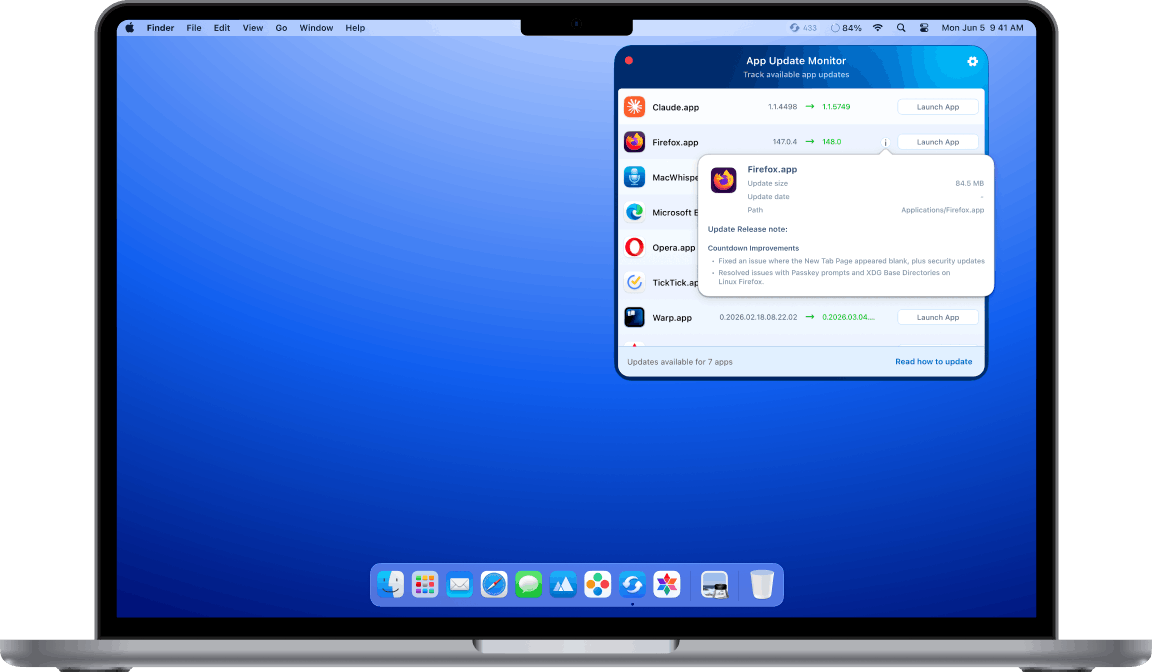
FireWally at macbook

Forget manual checking

Never miss a critical security patch

Get verified update sources

Audit your standalone library

How it works

1

Download

Get App Update Monitor free from the Mac App Store.

2

Launch

See all available fresh versions for all your installed apps.

3

Update

Choose which apps you want to update, and jump to the right place to do it.

Why staying current matters

Digital hygiene and security

Stop ignoring those annoying update prompts. Outdated software isn’t just slow; it’s a security risk.

With App Update Monitor, the latest versions of your favorite tools are always one click away in your Menu Bar. Refresh your apps and shield your Mac in seconds.

Better performance

Updates bring new features, performance improvements, and bug fixes.

App Update Monitor scans for updates across all major frameworks, ensuring that even your most niche tools are always current.

Protection with сontrol

Apple’s security guidelines prevent apps from automatically updating other software on your system.

We believe you should know exactly what’s happening on your Mac. Our app provides a complete, transparent list of every available update, so you remain in total control.

Want to update all apps with one click?

App Update Monitor shows you what needs updating. App Cleaner & Uninstaller actually updates them.

  • Auto update all your apps
  • Uninstall apps completely
  • Control app permissions
  • Manage startup programs & extensions
App Cleaner & Uninstaller updates tab

Save time with batch updates

Scan for updates
Detailed version logs
Web apps
App Store apps
One-click batch update
Complete uninstallation
App permissions check
Remaining files cleanup
Startup programs & extensions control

App Update Monitor

App Update Monitor

Free

App Cleaner & Uninstaller

App Cleaner & Uninstaller

Pro

Frequently asked questions

Is App Update Monitor free?

Yes, completely free. No subscription, no in-app purchases, no trial limitations. Download from the Mac App Store and use all features at no cost.

Can it install updates automatically?

No. App Store rules prevent apps from modifying other apps. App Update Monitor only shows you which apps have updates and helps you get to the right place to update them. For batch updating, try App Cleaner & Uninstaller with its built-in bulk Updater.

Which update sources does the app support?

It provides industry-leading coverage by tracking updates across the following distribution platforms: Sparkle, Electron, Squirrel, Homebrew, and GitHub releases.

Can I ignore specific updates?

Yes. If you prefer to stay on an older version of a specific app (for compatibility or workflow reasons), you can simply skip or ignore that version.

Is it safe to use Nektony’s App Update Monitor?

Yes, absolutely. Safety is our core priority. All Nektony applications, including App Update Monitor, are notarized by Apple, meaning they have been scanned for malicious components and meet Apple’s strict security requirements for macOS software.

Is it a Macupdater alternative?

Yes. Both App Update Monitor and App Cleaner & Uninstaller are ideal replacements for the now-unsupported app. Backed by Nektony’s 10+ years of macOS expertise, our tools support all the frameworks you’re used to, making them the perfect transition for anyone seeking a stable, long-term MacUpdater alternative.

Scroll to Top