
March 27, 2026
Latest vs App Cleaner & Uninstaller: Which Mac updater works better?


Share


If you have ever tried updating Mac apps by yourself, you know how fragmented the process is. One app sends you to the App Store. Another opens a browser tab. A third asks you to download a new version from somewhere else. It works for sure, but it’s not exactly the smooth experience people expect from macOS.
Dedicated utilities make that job easier. They promise a single dashboard where you can update apps on Mac without bouncing between tabs. But these tools handle this differently. And in Reddit threads, Latest and App Cleaner & Uninstaller show up pretty often as a replacement for MacUpdater.
In this in-depth comparison, I thoroughly tested both tools to see which is more result-oriented and time-saving. Check out how well each tool finds updates, gets them installed, and how much effort it actually takes along the way.
Testing methodology for Mac updaters
To analyze how good Latest and App Cleaner & Uninstaller are at updates, I tried these tools under the same following conditions.
Test environment:
- macOS Tahoe 26.3
- MacBook Pro M1 (2020)
- 62 third-party apps installed
Tested versions:
- App Cleaner & Uninstaller 9.1.1
- Latest 0.11
During testing, I paid attention to a few practical things:
- Findings and speed: how quickly/how many updates the tool finds.
- App coverage: what types of apps each tool supports.
- UI/UX convenience: how easy it is to navigate.
- Update flow: how many steps it takes to install updates.
- Update settings: whether there is a skip list.
- Multi-app update: whether you can update everything in one go.
- In-app update: whether updates install directly inside the tool.
- Extra features: what else the tool can do, other than updates.
Quick overview of Mac app updaters in a table

|
|
|
|---|---|---|
| Price | Free | Paid from $7.95 (free 2-day trial) |
| Trial | 2 days (all features, no card required) |
No trial needed — fully free |
| macOS support | macOS 10.15+ | macOS 11+ |
| Update frameworks | App Store, Sparkle | App Store, Sparkle, Electron, Homebrew, GitHub, and more |
| Updates detected (test) | 10 | 27 |
| Scan speed | ~4 sec | ~4 sec |
| CPU/RAM usage | ~60–70 MB | ~280 MB |
| False positives | Yes | Yes |
| Batch update | Limited | Yes |
| Skip or ignore apps | Yes | Yes |
| Update installation | Redirects to App Store | Inside the app |
| App notarization tab | No | Yes |
| App permissions info | No | Yes |
| Extra tools | No | Yes (app management features) |
Latest: free, lightweight, and minimal updater only
|
|
Cost: Free |
|---|---|
| Compatibility: macOS 10.15+ | |
| Update frameworks: App Store, Sparkle |
Latest is as straightforward as a Mac basic updater can be. The main thing - it’s free.
When you open the tool, there’s one main window showing a list of available updates and installed apps. The interface uses Apple’s standard design patterns, so navigation feels familiar right away. Nothing complicated.
When you are about to update an app, most actions take you two clicks. But here’s the catch: Updating App Store apps that were originally downloaded from a developer’s website doesn’t happen out of the box. Instead of completing the update inside Latest, you still have to open the App Store manually.


Just like in App Cleaner & Uninstaller, there’s a small info panel on the right with basic app details. There is also an Update All option, but it’s tucked away in the top menu, so not something you notice right away.
Settings are mediocre. In the settings panel, you can:
- Specify folders where the app should search for programs
- Choose whether unsupported apps should appear in the list
Updating results
In my 62-app setup, Latest detected 10 available updates. That number is much lower than Nektony’s tool. The explanation is simple: Latest currently understands only two update systems:
- App Store and
- Sparkle-based updaters.
Apps using other frameworks don’t appear in the update list.
The scan itself took around 4 sec, which is fast enough that you barely notice it. During scanning, it used 60–70 MB of RAM, which is minimal by modern macOS standards. This means Latest is extremely lightweight.
Pros:
Free to use
Very lightweight
No false positives
Fast scans
Cons:
Poor detection numbers
Some updates need manual steps
No pro update options (autoupdate, alerts)
No additional features
App Cleaner & Uninstaller: updating and managing apps
|
|
Pricing: $7.95/month • $14.95/year • $34.95 one-time |
|---|---|
| Trial: all features are free for 2 days | |
| Compatibility: macOS 11.0+ | |
| Update frameworks: AppStore, Electron, Sparkle, Squirrel, GitHub, Homebrew apps | |
| Rate: 4.8 by TrustPilot |
App Cleaner & Uninstaller is about a broader perspective. The updater lives inside a larger app management tool that also helps you uninstall apps, reset them, remove leftovers, manage startup items, control extensions, clear caches, or set default apps.
Its design reminds me of the macOS Tahoe style, and the layout is intuitive for any user. But what’s interesting here is how smoothly the update workflow fits into the app. In contrast to Latest, App Cleaner & Uninstaller installs updates directly inside the app.

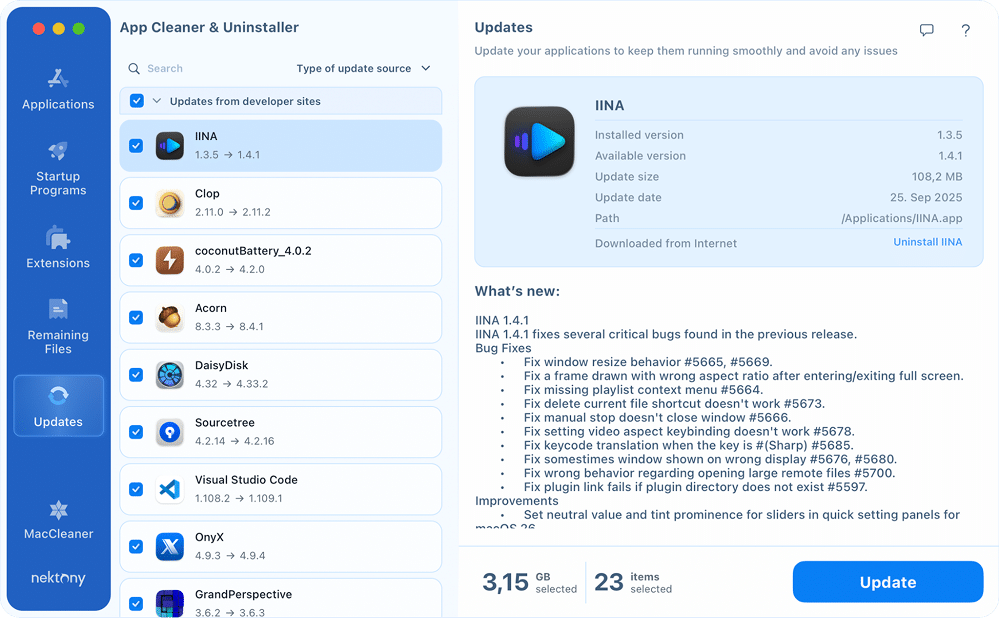
The update process takes you a few clicks:
Open Updates tab → select apps → click Update → confirm.
As a result, you can select multiple apps and get them updated in one click. No jumping between the App Store, developer sites, or apps.
In the settings, you can customize where the app searches for installed software, create a skip list, and adjust how the interface is displayed.
It has a small helper agent, which shows quick information about:
- available updates
- unused apps
- startup programs
- installed apps
Nothing intrusive, you can get quick status information when you need it.
There is also the information panel on the right side. It shows additional data such as:
- granted permissions
- notarization status
- code signature details
- a short AI-generated summary describing the app’s purpose


Updating results
On the same Mac with 62 installed apps, App Cleaner & Uninstaller found 27 updates. That’s significantly more than Latest. The reason is wider source coverage, including: App Store, Sparkle, Electron, GitHub, Homebrew, Squirrel, and other frameworks.
The scan itself took around 4 seconds, which puts it in the same speed range. During the test, I successfully installed all detected updates and found no false positives. RAM usage was higher, about 280 MB, which is expected for a multi-purpose utility.
Pros:
Out-of-box & batch updates
Solid detection numbers & fast scans
No false positives
Extra app management tools
Cons:
Short trial period
Paid tool after trial
Higher RAM usage
No pro update options (autoupdate, alerts)
Final feeling: which updater to pick for Mac in 2026
So, if you don’t want to babysit updates, having a dedicated updater makes a lot of much sense. App Cleaner & Uninstaller and Latest could be your tool. Both are notarized and safe.
Choose Latest if:
- you want a free, simple, and lightweight update checker
- you don’t mind installing updates manually
Choose App Cleaner & Uninstaller if:
- you want updates done at once and in one place
- you value extra app management tools
Frequently asked questions
What is a good alternative to MacUpdater?
After MacUpdater stopped development in 2026, several alternatives appeared. Popular options include Latest, Updatest, and App Cleaner & Uninstaller.
- Latest: a free and lightweight updater. Good for basic checks, especially for App Store and Sparkle apps.
- Updatest: a more advanced updater with broader framework support and deeper control, though sometimes less straightforward to use.
- App Cleaner & Uninstaller: combines updating with full app management and installs most updates directly inside the app.
How do I update all apps on my Mac at once in App Cleaner & Uninstaller?
Getting all your Mac apps updated with App Cleaner & Uninstaller takes you 4 clicks:
- Open the tool → switch to the Updates section.
- Select the apps to be updated.
- Click the Update button.
- Confirm the action by reviewing the list of apps and clicking Update.
What apps can I update in App Cleaner & Uninstaller?
App Cleaner & Uninstaller detects apps installed from multiple sources, including:
- App Store apps
- Sparkle-based apps
- Electron apps
- Squirrel apps
- Homebrew packages
- Various developer-site applications
So it covers most software you'd normally install on a Mac.