


March 13, 2026
Top 7 uninstallers for Mac in 2026: Tested and ranked

Share


If you are looking for a dedicated uninstaller, you likely already know that dragging an app icon to the Trash leaves behind a trail of service files, caches, and logs. However, in 2026, it’s a real challenge to choose one such uninstaller from the dozens of available options that won’t compromise your system’s security or waste your time by leaving behind hundreds of leftover files.
I’ve tested seven popular Mac uninstallers on macOS Tahoe 26.3 to see how they actually handle the dirty work. Below is a breakdown of what each tool does best, so you can choose the specific uninstaller that fits your workflow and technical expertise.
Here’s how I tested Mac uninstallers
In order for you to pick the right uninstaller, I put seven popular tools to the test on a Mac running the latest macOS Tahoe. To see how deeply each app scans the system, I benchmarked them by uninstalling complex applications like Google Chrome and Little Snitch.
In my analysis, I paid attention to the following aspects:
- Price and trial. How much it costs and if there’s a free trial to test it before buying.
- macOS compatibility. Whether the tool supports older systems or only the latest ones.
- Scan speed. How fast the app scans your directory and finds leftover files.
- Chrome files found. How many hidden service files each tool managed to dig up during the Google Chrome benchmark.
- RAM usage. How much system memory the tool consume while actively scanning.
- Extra features. What else the tool can do, such as managing startup apps, disabling extensions, or updating your software.
So before we dive into the deep technical breakdown of each application, the table below provides a high-level overview of our results. This allows you to compare the primary pricing models, trial availability, and standout features at a glance.
Comparison table of Mac uninstallers (2026)

|
 CleanMyMac
 |

|

|

|

|

|
|
|---|---|---|---|---|---|---|---|
| Price | $14.95/year or $34.95 one-time |
$40.20/year or $119.95 one-time |
$16.99 one‑time | Free | Free | $29.95 one-time | $19.95 one-time |
| Trial | 2 days | 7 days | 15 days |
(free)
|
(free)
|
Scan only | 5 app removals |
| macOS compatibility | macOS 11.0+ | macOS 11.0+ | macOS 10.13+ | macOS 13.0+ | macOS 10.14+ | macOS 10.11+ | macOS 10.14+ |
| Scan speed | ~9 seconds | ~11 seconds | ~3 seconds | Instant | ~2 seconds | ~4 seconds per app | Instant |
| Chrome leftovers found | 7.93 GB | 7.2 GB | 5.68 GB | 8.01 GB | 1.99 GB | 1.85 GB | 2 GB |
| RAM usage | ~346 MB | 440+ MB | ~201 MB | 75-250 MB | ~50 MB | ~130 MB | ~201 MB |
| Delete remaining files | |||||||
| Manage startup apps | |||||||
| Manage extensions | |||||||
| Update apps | In dev | ||||||
| Extra system cleanup | |||||||
| Checks Apple's app notarization status |
(in Business plan)
|
||||||
| App permissions overview |
While this table gives you a snapshot, the true value of an uninstaller lies in its details. We studied various Reddit threads and Apple Discussions to figure out what matters most to Mac users when it comes to choosing a Mac app uninstaller. So, in the following sections, we’ll explore how such apps handle complex uninstalls (such as Google Chrome and BBEdit), their real-world impact on your Mac’s resources, and which are actively maintained to support the latest macOS updates.
Detailed review of top Mac uninstallers
In this section, we analyze each tool based on real-world performance on macOS Tahoe 26.3. We focus on their ability to locate service files, their impact on system resources, and their overall value for different types of users.
App Cleaner & Uninstaller - A 360-degree app manager
|
|
Price: $14.95/year or $34.95/one-time |
|---|---|
| Compatibility: macOS 11.0 or newer | |
| Trial: 2 days, fully featured | |
| Rating: 4.8/5 (Trustpilot) |
App Cleaner & Uninstaller is designed for users who want a professional-grade app management tool that feels like a native part of the system. You can go hunting for these hidden service files manually in your Library folders, but if you prefer to spend that time not digging through system directories, this tool offers a much faster way out.

The app features a modern interface organized into five clear tabs: Applications, Startup Programs, Extensions, Remaining Files, and Updates. In our tests, it proved highly efficient at identifying deep-seated files, including tricky installation packages, which it safely moves to a separate category to prevent accidental loss. It goes beyond simple deletion by allowing you to disable launch agents and browser extensions in a single click.

In addition to managing the app uninstallation process, App Cleaner & Uninstaller also checks them for updates, which ultimately makes it an all-in-one manager of all apps on your Mac.
Long story short, it is a smart, automated choice for keeping your Mac clean without a steep learning curve.
Pros:
High-accuracy file detection
Monitoring privacy permissions
App updater
Cons:
Only a 2-day free trial
CleanMyMac - Best for comprehensive Mac maintenance
|
|
Price: $40.20/year or $119.95/one-time |
|---|---|
| Compatibility: macOS 11.0 or newer | |
| Trial: 7 days, full-featured | |
| Rating: 4.7/5 (Trustpilot) |
CleanMyMac is an “all-in-one” utility where the uninstaller is just one part of a massive optimization engine. It features a highly polished design and focuses on automated routines that take the guesswork out of system maintenance.
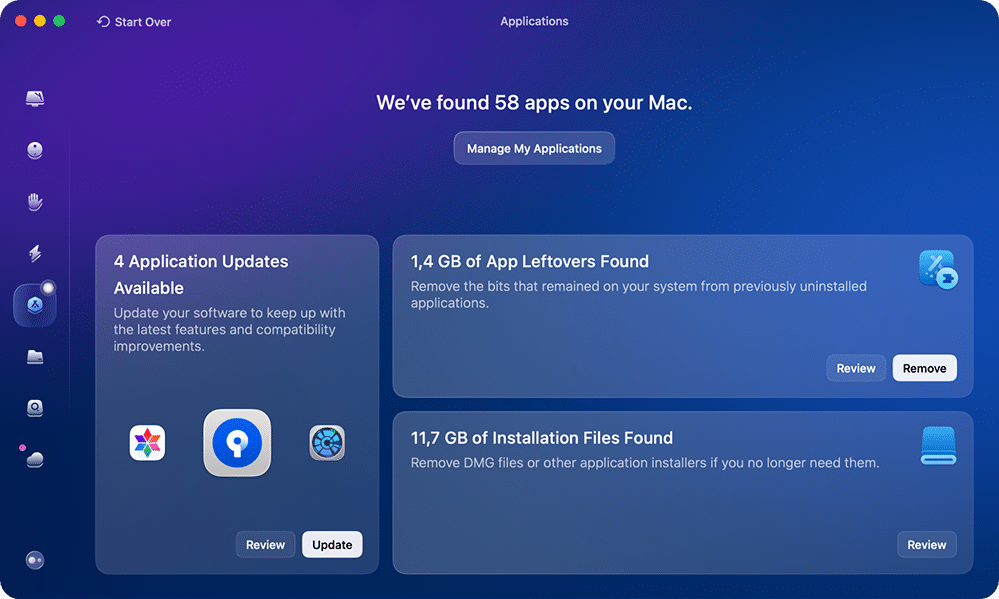
If you want a single “set it and forget it” tool for all your Mac needs, this app provides modules for malware protection, system junk, and even cloud storage management. It also supports batch actions, allowing for easy bulk uninstallation of multiple apps at once.

However, because it packs so many features into one dashboard, it can be quite heavy on system memory during scans. It is an excellent choice for users with modern hardware who want a broad system optimizer.
Pros:
Lots of features for Mac maintenance
Manages startup apps and extensions
Polished design
Cons:
Free trial requires a credit card
Consumes a significant amount of RAM
TrashMe - Best for a modern macOS interface
|
|
Price: $16.99 one-time |
|---|---|
| Compatibility: macOS 10.13 or newer | |
| Trial: 15 days | |
| Rating: 4.7/5 (App Store) |
TrashMe offers a feature-rich experience with a design that feels right at home on modern macOS systems. It balances a clean user experience with a broad set of maintenance tools, making it more of a system utility than a simple standalone uninstaller.

One of its standout features is a smart agent that monitors your Trash and automatically offers to perform a clean uninstall when an app is deleted manually. Beyond app removal, it includes modules for cleaning system caches, managing startup items, and finding duplicate files.
As one of the few uninstallers available directly on the Mac App Store, it also ensures a high level of security through Apple’s sandboxing rules.

Pros:
Smart Trash monitoring agent
Available on the Mac App Store
Includes duplicate finder and cache cleaner
PearCleaner - Best for advanced users and developers
|
|
Price: Free (Open Source) |
|---|---|
| Compatibility: macOS 13.0 or newer | |
| Trial: Free | |
| Rating: 4.2/5 (MacUpdate) |
PearCleaner is a modern, open-source alternative that provides a significantly deeper level of system control. While it is inspired by simpler tools, it adds a suite of advanced features tailored for developers who need to manage complex environments.

It includes tools for managing Homebrew packages, system services, and even a built-in console for troubleshooting. A unique standout is its “App lipo” feature, which removes unused architectures from universal apps to save disk space.
However, this level of power means it can sometimes flag general system folders, requiring a bit of caution before you hit delete. It is ideal for power users who prefer high transparency and advanced management tools.
Pros:
100% free and open-source
Advanced Homebrew and plugin management
Includes an "App lipo" feature to shrink app size
Cons:
Can be overly aggressive with file detection
May require technical knowledge to use safely
AppCleaner - Best for a minimalist, single-task workflow
|
|
Price: Free |
|---|---|
| Compatibility: macOS 10.14 or newer | |
| Trial: Free | |
| Rating: 4.9/5 (MacUpdate) |
AppCleaner is a veteran free utility designed for users who prefer a straightforward “one-task” tool. Its design follows a classic system style, focusing entirely on finding and deleting related files when you drop an application into its window.

It features a helpful SmartDelete option that monitors your Trash and automatically offers to clean up leftover files when you delete an app the standard way. It is extremely lightweight, barely making a dent in your Mac’s RAM during scans.
Keep in mind that it hasn’t received major updates in a few years, which might impact its long-term compatibility, but it remains a solid choice for simple, single-app removals.
Pros:
Totally free and extremely lightweight
SmartDelete background monitoring
Incredibly simple drag-and-drop interface
Cons:
No multi-selection (one app at a time)
Has not been updated since 2023
Lacks extra system management tools
OSX Uninstaller - Best for a granular, manual-style breakdown
|
|
Price: $29.95 one-time |
|---|---|
| Compatibility: macOS 10.11 or newer | |
| Trial: Scan only | |
| Rating: N/A |
OSX Uninstaller takes a highly manual approach to app removal, providing a detailed list of every individual file and folder associated with an application.
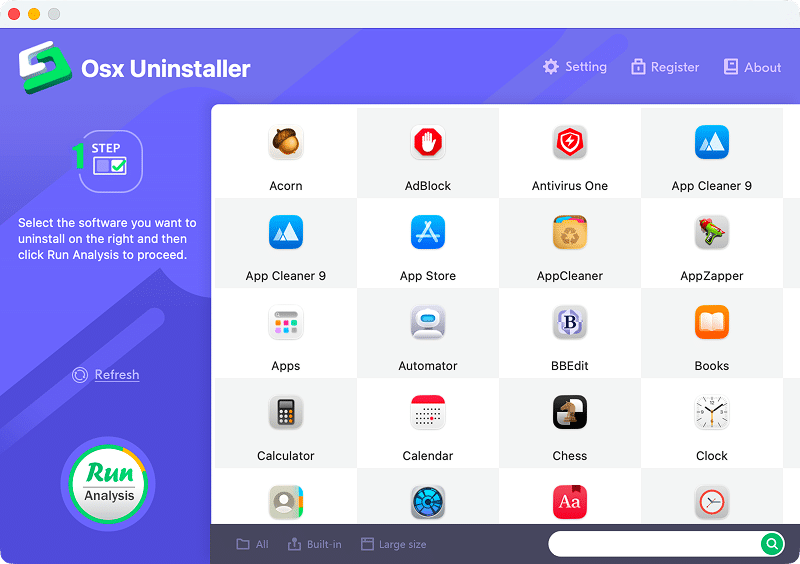
Its design is relatively basic and lacks the structured, categorized layout seen in newer utilities. Instead of grouping files into neat folders, it lists every single path, which appeals to users who want to verify exactly what is being deleted.
Interestingly, it displays a “difficulty level” for manual removal for each file, though it acts mostly as a scanner until you purchase a license. It is strictly for users who prefer raw data and a highly manual visual breakdown before committing to an uninstallation.
Pros:
Shows every single file path in detail
Displays manual removal difficulty
Very low RAM consumption
Cons:
Basic, outdated interface
No functional trial (can only scan)
Pricey for a single-purpose tool
AppZapper - Best for a nostalgic "Drag & Zap" experience
|
|
Price: $19.95 one-time |
|---|---|
| Compatibility: macOS 10.14 or newer | |
| Trial: 5 app removals | |
| Rating: 3.7/5 (MacUpdate) |
AppZapper is a veteran in the Mac utility space, famous for its satisfying “Drag & Zap” workflow. It features a design reminiscent of older macOS versions, which carries a certain nostalgic charm. It is incredibly simple to use and includes dedicated tabs for removing smaller items like Widgets, Settings (the preference panes files), and Plugins.

While its simplicity remains appealing, the app has not been updated since 2020. This lack of active maintenance means it might struggle to find hidden service files in newer macOS directory structures.
I believe it is best suited for users who appreciate a classic interface and only need to perform basic uninstalls of older applications.
Pros:
Very simple drag-and-drop interface
Dedicated tabs for widgets and plugins
Nostalgic, straightforward user experience
Cons:
Outdated design and architecture
Not updated since 2020
May miss hidden files on newer macOS versions
Conclusion: How to choose the right Mac uninstaller
Honestly, choosing an uninstaller in 2026 comes down to how much you value your time, your Mac’s memory, and your budget. Dragging an app to the Trash just like Apple recommends is a habit from the past, and any of the tools listed above will do a better job than macOS does out of the box.
Here is how to decide what fits your needs:
- Security and trust: Always look for software that is Apple-notarized. This ensures the app has been checked for malicious components.
- Update frequency: macOS evolves quickly. A tool that receives frequent updates is more likely to remain compatible with the latest macOS Tahoe directory structures than a tool that hasn’t been updated in years.
- Residual detection accuracy: Not all scanners are equal. If your primary goal is to reclaim storage, prioritize tools with high detection rates that can dig out gigabytes of hidden caches and logs.
- System impact: If you are using a Mac with limited RAM (8 GB or less), look for lightweight options to avoid system slowdowns during the scanning process.
- Value for money: Consider whether you prefer a one-time purchase or a subscription. Powerful open-source and free alternatives are also available if you are on a strict budget.
Final list of Mac uninstallers
Each tool plays its part in its own way. Here is a quick summary to help you make your final choice:
| Tool | Best for users who… |
|---|---|
| App Cleaner & Uninstaller | Want a professional app manager to completely remove apps, manage startup items and extensions, update apps, and check their security. |
| CleanMyMac | Want a comprehensive, all-in-one Mac optimization and maintenance suite. |
| TrashMe | Want a modern, Apple-approved uninstaller with a few extra system utility features. |
| PearCleaner | Are developers or advanced users who prefer highly transparent open-source tools. |
| AppCleaner | Want a totally free, minimalist drag-and-drop tool for simple single-app removals. |
| OSX Uninstaller | Prefer to see a granular, manual-style breakdown of every single file path. |
| AppZapper | Appreciate a nostalgic, classic interface and only need basic uninstalls. |