May 28, 2026
MacKeeper vs. MacCleaner Pro: A real-world comparison


Share


Mac users searching for a cleanup tool often keep landing on the same two names. MacKeeper and MacCleaner Pro both promise to free up disk space, speed the system up, and put cleanup chores on autopilot – yet they take very different paths to get there.
I ran both apps on the same slightly aged MacBook (Apple M1, 8 GB RAM, macOS Tahoe 26.4.1) and tracked scan time, RAM footprint, what each scan actually surfaced, and how aggressive each app gets with upsell prompts. The breakdown below covers what each tool does, how the pricing stacks up, and which user each one is built for.
MacKeeper vs. MacCleaner Pro: key highlights
Here is how MacCleaner Pro and MacKeeper compare at a glance before the full breakdown.

|

|
|
|---|---|---|
| Price model | Subscription only | Subscription or one-time purchase |
| Best for | Users who need a tool for Mac maintenance, with an antivirus and VPN on top of the cleanup tools | Users who want a utility focused deeply on keeping their Mac clean from unnecessary files |
| Biggest practical downside | Bigger RAM consumption and shallower cleanup | No protection against online threats compared to MacKeeper |
| Trustpilot rating | 4.3/5 (MacKeeper) | 4.8/5 (Nektony) |
How we compared MacCleaner Pro and MacKeeper
Both apps were tested back-to-back on the same machine and the same disk, so the numbers are directly comparable. Both products are notarized by Apple and require Full Disk Access for full scans, and both run natively on Apple Silicon (M1–M5) without Rosetta 2 (a compatibility layer for older Intel apps).
Methodology and criteria
During testing, I paid attention to a few practical things:
- Pricing model: one-time vs. subscription, and how much the free trial actually unlocks.
- Cleanup depth: junk caches, installation files, screenshots, and what each scan misses.
- App removal: how thoroughly each uninstaller wipes leftovers from , LaunchAgents, and other possible places.
~/Library/Application SupportCopy
- System load: RAM idle and during scans, plus how long a full scan takes on the same disk.
- Security extras: whether antivirus, VPN, and password tools are bundled, and whether they meet a real need.
- User experience: how often each app interrupts you with upsell pop-ups and notifications during normal use.
- Vendor track record: developer history, Trustpilot scores, and feedback from Apple Support Communities.
Feature matrix: price, trials, capabilities
This first table covers the basics – what you pay, how the trials behave, and the platform support you get on day one.
|
|
|
|
|---|---|---|
| Price | $71.40/year (subscription only) | $39.95/year or $85.95 one-time |
| Free trial | 7-day scan-only trial | 2-day full-feature trial |
| macOS compatibility | macOS 10.15 (Catalina) and newer | macOS 11.0 (Big Sur) and newer |
| Apple notarized | ||
| Apple Silicon native | ||
| Localizations | 18 languages | 8 languages |
| Vendor | Clario Tech (pre-2019: Kromtech) | Nektony (since 2011) |
Feature-by-feature insights
The second table goes deeper into the actual cleanup work. It surfaces the included modules, how each app behaved on the test machine, and where their feature lists diverge.
|
|
|
|
|---|---|---|
| Included modules | One bundled suite with Find & Fix, Cleaning, Security (antivirus + Adware Cleaner), Performance, and Privacy (VPN + StopAd + ID Theft Guard) | Six standalone apps in the suite: App Cleaner & Uninstaller, Duplicate File Finder, Disk Space Analyzer, Memory Cleaner, Funter |
| Observed scan load | ~705 MB RAM idle, ~914 MB during scan; full scan ~65 seconds | ~398 MB RAM during scan, ~297 MB after; full scan ~18 seconds |
| Junk surfaced on the same disk | 3.6 GB junk, 28.98 GB installation files, 450.8 MB screenshots, no purgeable category, 5.28 GB Trash | 4.71 GB junk, 29 GB installation files, 468 MB screenshots, 573 MB purgeable, 4.78 GB Trash |
| Built-in antivirus | Avira-powered engine plus Adware Cleaner | focused on cleanup only |
| VPN | Private Connect | |
| Duplicate finder | basic duplicate scan plus similar photos | bit-by-bit compare, similar files, folder merging |
| Browser extension manager | ||
| Hidden files finder | Funter | |
| Purgeable space cleanup | ||
| Real-time anti-malware protection |
Measured cleanup results: what each scan actually found
Both apps were pointed at the same SSD on the same day, with no manual cleanup between runs, so the numbers below describe the same underlying disk state.
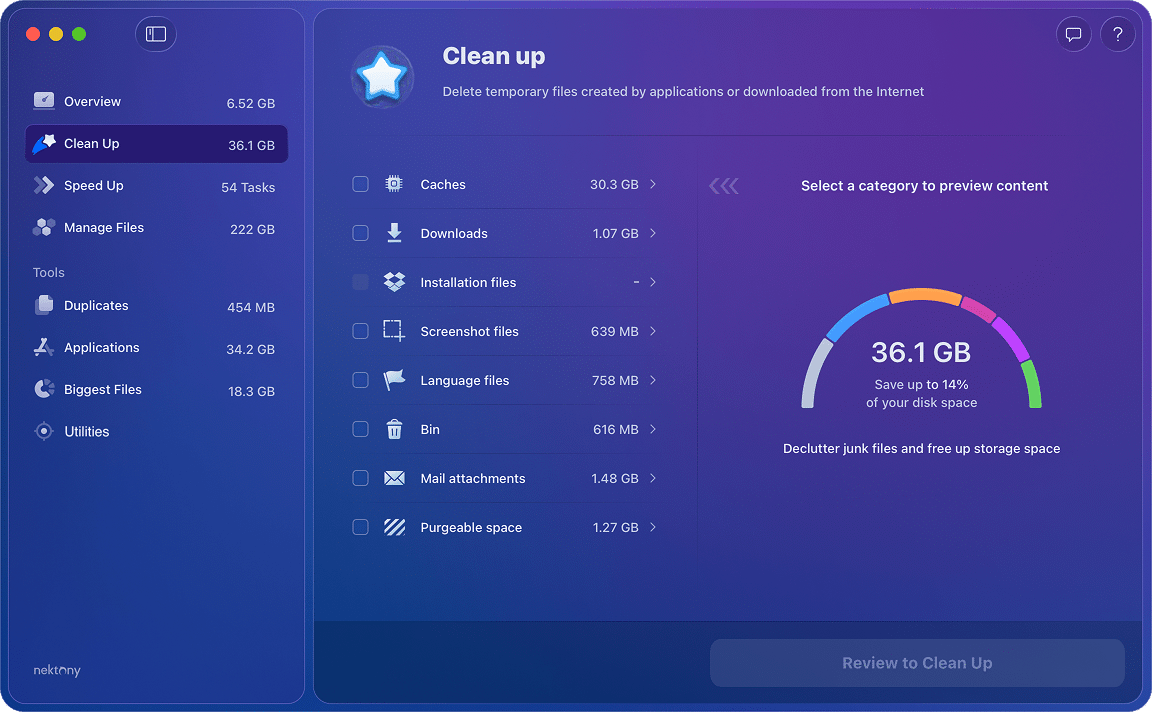
MacCleaner Pro reported 4.71 GB of junk, 29 GB of installation files, 468 MB of screenshots, 573 MB of purgeable space, and 4.78 GB in the Trash. Purgeable space – the chunk of disk that macOS itself can free on demand – gets its own category, which makes it easy to reclaim when you actually need the room.
What users say:
MacCleaner Pro can safely clean up and speed up a Mac with just a few clicks.
~/.Trash
Copy
Volumes/Archive/.Trash
Copy

What stood out to me is how each app classifies what it finds. MacCleaner Pro keeps installation files, screenshots, language files, and Mail attachments in their own buckets so you can decide what to wipe. MacKeeper folds screenshots into the duplicates view, which makes the totals harder to reason about at a glance.
Dashboards and disk maps: how each app frames the storage view
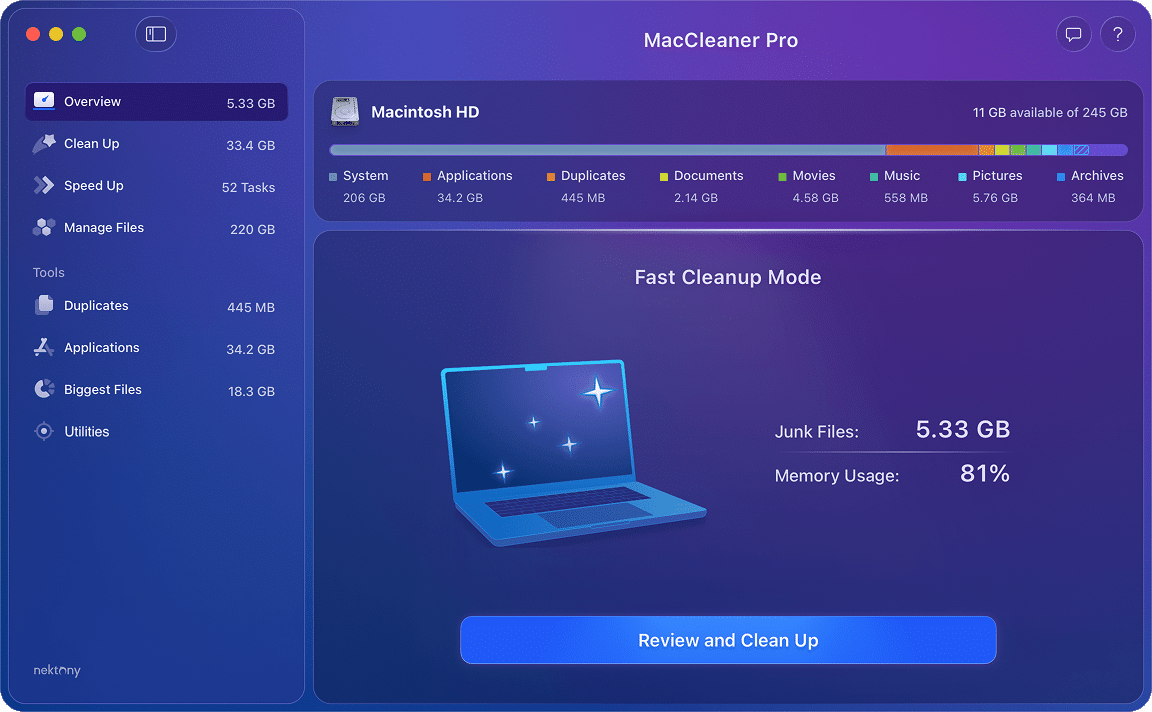
MacCleaner Pro opens to an Overview tab that bundles the most common cleanup actions – caches, logs, installation files, Safari caches, Trash, and a quick RAM optimization – into a single one-click sweep. From there, the suite splits into Clean Up, Speed Up, Manage Files, Duplicates, Applications, and Biggest Files, each backed by a dedicated standalone app.
MacKeeper opens to Find & Fix – a single dashboard that runs a full scan across cleanup, antivirus, and adware in one pass. The category list is wider (Cleaning, Security, Performance, Privacy) but each panel is shallower than its MacCleaner Pro counterpart, and you cannot pick a single tool to launch on its own.

In day-to-day use, the MacCleaner Pro layout feels closer to a toolbox: open the tool you need, finish the job, close it. MacKeeper feels closer to a security suite that happens to clean caches – there is more on the screen at any given moment, but also more places where the app pushes you toward Privacy and Security upsells.
App removal: how each uninstaller handles leftovers
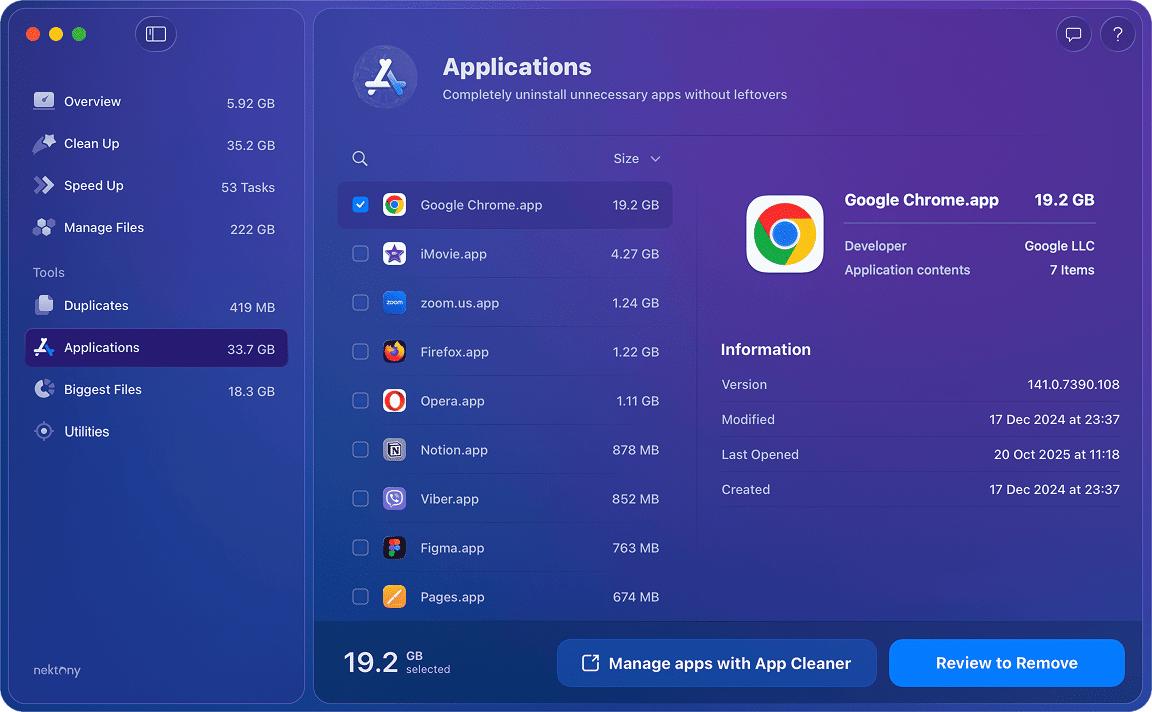
This is the section where MacCleaner Pro and MacKeeper diverge most. MacCleaner Pro ships its Applications view backed by App Cleaner & Uninstaller, which scans every app bundle for service files, preferences, caches, logs, login items, and browser extensions. You can wipe an app and all of its tracks from one place, including extensions tied to Safari or Chrome that survive a normal uninstall.
MacKeeper’s Cleaning > Apps Uninstaller covers the basics – drag, scan, remove – but the leftover list is shallower. It does not surface browser extensions in the same place, and there is no equivalent of the bulk language-file or Mail-attachment cleanup.

The bigger issue is what happens when users want to remove MacKeeper itself. Apple Support Communities and r/applehelp threads going back years describe the same pattern: drag-to-Trash leaves behind LaunchAgents, login items, and helper files in
~/Library/Application Support/MacKeeper Helper/
Copy
~/Library/LaunchAgents/
Copy
What users say:
MacKeeper has a HORRIBLE reputation. You definitely do not need it but you also may have difficulty getting rid of it.
The situation has improved since these reviews were published, but such a history is worth being aware of. If you ever need to remove MacKeeper, we have a dedicated How to uninstall MacKeeper from Mac article on our blog.
Speed and memory pressure during scans
MacCleaner Pro finished a full Overview pass in roughly 9 seconds and a deep scan across all six tools in about 18 seconds. RAM use sat near 398 MB during the scan and dropped back to about 297 MB once it finished.

On Apple Silicon, the Memory Cleaner module inside MacCleaner Pro is also less impactful than it was on Intel Macs – unified memory manages inactive RAM differently, so freeing it forcibly does not yield the same speed-up. Both apps still help on systems running low on free space, but neither one is a substitute for closing the heavy app that is actually pinning your memory.
What users say:
The app runs fast, cleans better than any other cleaner I’ve used.

MacKeeper idled at around 705 MB and climbed to ~914 MB during a full Find & Fix run, which took about a minute and five seconds. Even the lighter Safe Cleanup pass – closer in scope to MacCleaner Pro’s Overview – took 16.5 seconds. On an 8 GB Mac you can feel the difference; the swap activity was noticeable while MacKeeper was running and Activity Monitor reported memory pressure climbing into yellow during the scan.
Antivirus, VPN, and the all-in-one trade-off
MacKeeper’s biggest selling point over a focused cleaner is that it ships with an antivirus engine, an Adware Cleaner, a Private Connect VPN, an ID Theft Guard, and the StopAd ad blocker. That is more breadth than any single Nektony tool offers, and for users who want one subscription to cover several jobs, it is a real convenience.

The fine print matters. According to Wikipedia, MacKeeper’s malware database is licensed from Avira, so the engine is a third-party component rather than something MacKeeper builds in-house. The VPN, ad blocker, and ID Theft Guard are similarly separate features, wired into a single UI rather than deeply integrated tools.

MacCleaner Pro makes a different bet: no antivirus, no VPN, just six tools that each do one cleanup job well. If you already use a dedicated VPN or rely on macOS’s built-in XProtect/Gatekeeper for malware checks, you are not really losing anything. If you want everything in one icon, MacKeeper has the broader bundle.
What users say:
I’ve been asked to help a handful of people out with their Macs over the years, and I almost always find MacKeeper has been installed. A lot of times they don’t even recall installing it.
On the test Mac, MacKeeper sent more than ten in-app notifications during the first day of use – most of them upsells for Premium subscriptions or warnings nudging me to enable Privacy features. That sits well with Macworld’s review, which praises MacKeeper’s breadth but also flags the aggressive in-app marketing as the main reason to think twice.
Trials and pricing details
For one Mac, MacCleaner Pro’s lifetime license is the best long-run value at $85.95. The annual subscription is also notably cheaper than MacKeeper, and Nektony’s seasonal promos often drop the lifetime price below $40. MacKeeper is subscription-only at $71.40/year or $14.95/month, with a family pack (3 Macs) available at a discount.
Pricing tiers at a glance
- MacCleaner Pro: $39.95/year, $85.95 one-time, family pack for 5 Macs available.
- MacKeeper: $71.40/year or $14.95/month, family pack for 3 Macs.
Free trial behavior
- MacCleaner Pro: 2-day trial that unlocks every tool in the suite so you can run real cleanups, not just scans.
- MacKeeper: 7-day trial that lets you scan but locks the actual cleanup behind a subscription, so the trial is closer to a demo than a free workout.
Support channels
- MacCleaner Pro: email support and a contact form at nektony.com.
- MacKeeper: in-app live chat is the headline support channel and is genuinely faster for first-line questions.
Which cleaner fits your workflow?
Use these quick rules of thumb to match each tool to the kind of cleanup you actually do.
Choose MacCleaner Pro if…
- You want focused cleanup tools with no antivirus or VPN bundled in.
- You prefer a one-time license over a recurring subscription.
- You want full uninstall coverage, including browser extensions, Mail attachments, and language files.
- You manage one Mac and want predictable RAM use during scans on Apple Silicon.
Choose MacKeeper if…
- You specifically want antivirus, a VPN, and a cleanup tool inside the same app.
- You like having an in-app live-chat support channel.
- You are comfortable with a subscription model and frequent upsell prompts in exchange for the bundle.
- You need a UI translated into one of MacKeeper’s wider list of localizations.
Verdict
If your goal is fast, transparent disk cleanup with no recurring fee, MacCleaner Pro is the safer pick – the trial unlocks every tool, the RAM footprint is half of MacKeeper’s, and the uninstaller actually pulls Mail attachments, language files, and browser extensions. MacKeeper is worth its price only if you specifically want a bundled antivirus and VPN under one icon, and if you accept the subscription model and the in-app upsell pattern that comes with it.