
April 17, 2026
Top 6 memory cleaners for Mac in 2026: tested and ranked


Share


If you search for the best memory cleaner for Mac, you quickly run into a familiar promise: free more RAM, speed up your Mac, and do it all with one click. The problem is that most of these apps are not really creating new memory out of nowhere, so the useful question is which ones actually help and under what conditions.
This roundup is based on practical testing rather than marketing claims alone. The goal is not to crown one universal winner for every Mac owner, but to show which tool fits which kind of workflow and what tradeoffs come with that choice.
In this guide, I first explain how memory cleaning actually works on macOS, then compare the tested tools, and finally show when it is smarter to rely on built-in system checks rather than another utility.
How memory cleaners actually work on Mac
A memory cleaner does not create extra physical RAM. In most cases, it puts pressure on macOS so the system rebalances cached, compressed, and inactive memory on its own.
That matters because a higher Free number alone is not a reliable sign of success. What matters more is whether memory pressure stays healthy and whether swap grows too aggressively after the cleanup.
The most useful categories to watch are App Memory, Compressed Memory, Cached Files, and Swap Used in Activity Monitor.

vm_stat
Copy

Note:
If you’re familiar with Terminal, you might know there’s a command sudo purge that’s supposed to clean up RAM and speed up your Mac. However, in practice, it frees up RAM that would have been freed anyway once the next app you open needs it. Discussions on Reddit reflect the same caution: forcing memory purges is not a way to clean memory and un-slow your Mac.
Here’s how I tested Mac memory cleaners
The test environment was macOS Tahoe 26.1 on a Mac with 8 GB of RAM, because that kind of limited-memory setup makes the side effects of RAM cleaners easier to see.
I compared the apps by their price model, trial availability, ease of use, safety, extra features, update cadence, localization support, and the real effect they had on memory behavior.
The most important part of the test was whether it improved the overall picture in Activity Monitor without causing an outsized swap penalty. Apple also notes that Activity Monitor is the place to inspect memory pressure and swap, which matches the methodology used here.
Comparison table of Mac memory cleaners (2026)
Use this table as a quick orientation layer before or after the detailed reviews. It condenses the most decision-relevant criteria so that you could make your final decision quickly.
 Memory Cleaner
 |

|

|

|

|
 MacCleaner Pro
 |
|
|---|---|---|---|---|---|---|
| Best for | Best free memory cleaner for everyday use | Best for power users who already want a utility suite | Best for the strongest raw cleanup effect | Best for monitoring RAM without cleaning it | Best free option for people who want more detail | Best if RAM cleanup is only one part of the job |
| Trial | Free | 14-day trial | 3-day trial | No | Free | 2-day trial |
| Price model | Free | Subscription | One-time purchase | One-time purchase | Free | Subscription or one-time purchase |
| Cleanup strength | ★★★★☆ | ★★☆☆☆ | ★★★★★ | ☆☆☆☆☆ | ★★★☆☆ | ★★★★☆ |
| Menu bar | ||||||
| Rating | 4.8 (TrustPilot) | 4.4 (MacUpdate) | 3.9 (MacUpdate) | 4.5 (App Store) | 4.5 (App Store) | 4.8 (TrustPilot) |
Detailed review of the best Mac memory cleaners
Memory Cleaner by Nektony - Best free memory cleaner for everyday use
|
|
Price: Free |
|---|---|
| Compatibility: macOS 10.13+ | |
| Localizations: 8 languages |
Memory Cleaner by Nektony is the easiest option in this group if you want a lightweight menu-bar utility that focuses on RAM cleanup without forcing you into a broader maintenance suite.
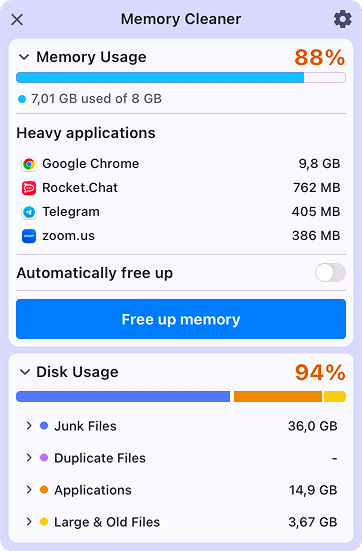
It delivered a visibly stronger short-term cleanup result than most competitors in this test, especially for App Memory, but the gain faded rather than becoming a permanent improvement, and swap usage increased after cleanup. However, I noticed this effect with all other memory cleaners in the test, so my take is that this is inevitable when you’re running with 8 GB of RAM in 2026+.
Notably, the app also offers automatic RAM cleanup that can run not only on a schedule but also based on RAM or CPU usage. You can find this option in the app’s settings.

Pros:
Free and simple to understand
Menu-bar workflow is fast for repeat use
Showed a noticeable drop in App Memory during testing
Cons:
The effect was short-lived on the 8 GB test Mac
Swap still increased after cleanup
Parallels Toolbox - Best for power users who already want a utility suite
|
|
Price: $24.99/year |
|---|---|
| Compatibility: macOS 10.14+ | |
| Localizations: Yes (12 languages) |
Parallels Toolbox makes the most sense for people who want a bundle of small Mac utilities and only see RAM cleanup as one feature among many, rather than the main reason to buy the app.

Its cleanup effect was extremely weak in my test: a bit of compressed memory was freed, but App Memory increased. This gave the impression that the app did basically nothing. This makes it hard to recommend Parallels Toolbox if freeing RAM is your main reason for buying it.

Pros:
Comes with many extra utilities beyond RAM cleanup
Clear interface for users who like toolbox-style products
Detailed memory information is easy to inspect
Cons:
Cleanup impact was weak in this test
The RAM feature is not available from the menu bar
Subscription pricing is hard to justify if memory cleanup is your only goal
Memory Clean 3 by FIPLAB - Best for the strongest raw cleanup effect
|
|
Price: $9.99/one-time |
|---|---|
| Compatibility: macOS 10.13+ | |
| Localizations: No |
Memory Clean 3 delivered the most aggressive short-term cleanup in this test, making it the best fit for users who care more about the immediate effect than extra features or long-term elegance.

The immediate effectiveness came with a tradeoff, though: a swap increased noticeably. I was also unable to test the Extreme Clean mode; it’s possible this one could’ve shown even better results.

Pros:
Produced the strongest visible cleanup result in the test
Detailed memory breakdown is useful for advanced users
One-time purchase model is simpler than a subscription
Cons:
The effect still faded after a short time
Swap increased sharply after cleanup
The app feels expensive for such a narrow use case
Memory Check - Best for monitoring RAM without cleaning it
|
|
Price: $1.99/one-time |
|---|---|
| Compatibility: macOS 14.0+ | |
| Localizations: Yes (21 languages) |
Memory Check is better treated as a monitoring tool than a cleaner. It can help you watch memory usage, but it is the wrong choice if your goal is to run an actual cleanup action.

The app has three key screens: one shows memory consumption, another shows more detailed per-process memory consumption, and the third just allows viewing running processes.
Since it doesn’t clean RAM, there’s nothing else to cover in this article.

Pros:
Good visibility into current memory usage
Useful if you only want to monitor pressure and processes
Straightforward App Store install path
Cons:
No real RAM cleanup feature
Paid despite the limited scope
Less compelling than free options that also clean memory
Memory Diag - Best free option for people who want more detail
|
|
Price: Free |
|---|---|
| Compatibility: macOS 13.5+ | |
| Localizations: No |
Memory Diag is a better fit than simpler tools if you want a free utility with more visibility into memory usage, even though its cleanup effect was modest in this test.

Speaking of cleanup, while it cleaned some of my Compressed and Wired memory, the indicators returned to their initial values quite quickly, just as with other apps.
One thing I feel I should add here is that the interface hides the cleanup action in the menu for some reason.

Pros:
Free and still reasonably informative
Shows heavy apps and memory details
Useful for users who want more visibility than a one-click widget
Cons:
The cleanup effect was modest
The interface hides the cleanup action more than it should
Results faded quickly after the test run
MacCleaner Pro - Best if RAM cleanup is only one part of the job
|
Price: $39.95/year, $85.95/one-time |
|---|---|
| Compatibility: macOS 11.0+ | |
| Localizations: Yes (8 languages) |
MacCleaner Pro is the strongest choice here if you want broader Mac maintenance rather than a single-purpose RAM utility. It treats memory cleanup as one part of a larger optimization toolkit.

Its RAM cleanup effect was solid (though temporary), but the broader value of the suite mattered more than the raw memory results alone.
MacCleaner Pro might be too expensive if you only want a RAM cleaner, but as a tool to speed up your Mac, it is able to confront and address any issue slowing down your machine.

Pros:
Broader maintenance value beyond RAM cleanup
Strong design and approachable workflow
Solid cleanup result without being limited to one narrow feature
Cons:
Too expensive if you only want a RAM cleaner
Some users may dislike the suite-style workflow
Conclusion: How to choose the right Mac memory cleaner
The main takeaway from this test is that no memory cleaner creates permanent extra RAM. These apps mostly trigger pressure, so macOS rebalances cache, compressed data, and swap on its own.
If you want the strongest short-term cleanup effect, Memory Clean 3 and Memory Cleaner looked stronger than the weaker options in this brief.
Personally, I use Memory Cleaner to quickly identify and kill the most memory-intensive apps and free up a couple of gigabytes of swap and RAM before launching a heavy AAA game on my Mac.
If you want broader maintenance rather than a single-purpose RAM tool, MacCleaner Pro is easier to justify.
Here is how to decide what fits your needs:
- Choose a lightweight standalone cleaner if you mainly want a quick menu-bar utility and simple one-click maintenance.
- Choose a more advanced tool if you care about detailed memory breakdowns and do not mind a steeper interface or a paid plan.
- Choose a broader maintenance suite if RAM cleanup is only one part of the Mac cleanup job you want to solve.
Final list of Mac memory cleaners
- Memory Cleaner by Nektony - Best free memory cleaner for everyday use
- Parallels Toolbox - Best for power users who already want a utility suite
- Memory Clean 3 by FIPLAB - Best for the strongest raw cleanup effect
- Memory Check - Best for monitoring RAM without cleaning it
- Memory Diag - Best free option for people who want more detail and act manually
- MacCleaner Pro - Best if RAM cleanup is only one part of the job