June 5, 2026
Tool to uninstall and update apps on Mac: Pearcleaner or App Cleaner & Uninstaller


Share


This in-depth article compares Pearcleaner vs App Cleaner & Uninstaller by Nektony. Here, you’ll learn how they work, what features and limits they have, and what to expect from them.
| Pearcleaner | App Cleaner & Uninstaller | |
|---|---|---|
| Target user | Power users, developers | All Mac users |
| macOS | 13 Ventura – 27 Golden Gate | 11 Big Sur – 27 Golden Gate |
| Bulk uninstall | Yes (watch false positives) | Yes (deep uninstall) |
| Remaining files | Yes (limited) | Yes (Remains list, grouped by app) |
| Update channels | Sparkle, App Store, Homebrew | App Store, Sparkle, Electron, Squirrel, Homebrew, GitHub |
| App database | No, dynamic scan | 20,000+ apps |
| Support | GitHub Issues | Dedicated team |
| Price | Free (fair-code license) | Paid ($14.95/year) • Free trial |
How I compared Pearcleaner and App Cleaner & Uninstaller
I ran tests on a MacBook Pro M1 with 8 GB RAM (updated to macOS Golden Gate 27), using Pearcleaner v5.4.3 and App Cleaner & Uninstaller 10.
As of the test, there were 81 applications on my Mac. I applied the same set of apps to both tools. The focus was based on our methodology and, inter alia, these criteria:
Methodology and criteria
- Uninstall accuracy. Tested by removing Google Chrome, BBEdit, and Little Snitch and comparing item counts, file sizes, and false positives between tools.
- Remaining Files detection. Checked both Orphans and Remaining Files features of a respective tool for completeness and usability of results.
- App updates coverage. Ran each tool’s updater on the same 81-app machine and recorded updates found, false positives, and missed apps.
- RAM usage during active scans. Measured using Activity Monitor for the main process and background helpers.
- Scan time. Timed how long each tool took to populate the Applications list from a cold start.
- Compatibility. Checked minimum OS requirements against vendor docs.
Pearcleaner: optimum free uninstaller and updater

|
Priced at: $0 (open source) |
|---|---|
| Rated at: 4.2 (by MacUpdate) | |
| Compatible with: macOS 13+ | |
| Notarized by: Apple |
Pearcleaner started as a simple drag-and-drop uninstaller built by solo developer Alin Lupascu (GitHub: alienator88) and grew into a Mac maintenance suite covering uninstall, Homebrew, developer cleanup, architecture slimming, and app updates.
By June 2026, it had over 13.3K GitHub stars, an unusual level of community trust for a single-developer utility. The project is released under a fair-code license: free for personal and open-source use, with restrictions on commercial redistribution.

Pearcleaner is a Universal Binary (arm64 + x86_64) that runs natively on Apple Silicon. It requires macOS 13 Ventura or later; attempts to install on macOS 12 Monterey return a system error: “requires macOS 13.0 or later”.
The app is distributed exclusively via GitHub, not the Mac App Store. Softpedia’s review described it as “far more than just a simple app uninstaller.”
Modules included in Pearcleaner v5.4.3:
- App Uninstall
- Orphans (orphaned file finder)
- Homebrew
- Developer (dev tools cleanup)
- Lipo
- Packages
- Plugins
- Services (LaunchAgents), and
- Updater

App Cleaner & Uninstaller: to uninstall deeper and update more apps out of the box
|
Priced at: $14.95/year • $34.95/one-time (2-day trial) |
|---|---|
| Rated at: 4.3 (by MacUpdate) | |
| Compatible with: macOS 11+ | |
| Notarized by: Apple |
App Cleaner & Uninstaller is a commercial Mac app manager developed by Nektony, a company founded in 2011 with 15+ years of continuous macOS utility development. Beyond uninstalling apps, it also helps you manage updates, check app trust and permissions, control which apps go online, and remove hidden leftovers for a more complete Mac cleanup.
With over 10 million users and a Trustpilot rating of 4.8/5, it’s among the most widely used third-party uninstallers for Mac. App Cleaner & Uninstaller also received a Red-Dot Design Award for its interface.
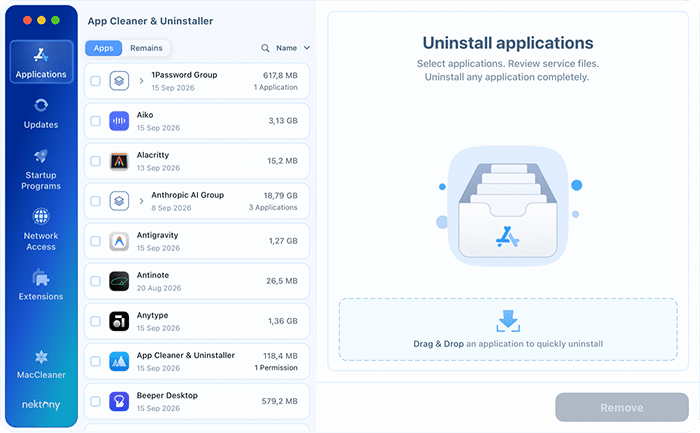
App Cleaner & Uninstaller 10 supports macOS 11 Big Sur through macOS 27 Golden Gate, two full major versions wider than Pearcleaner. It’s a Universal Binary, notarized by Apple, and available directly from Nektony’s site.
Modules included in App Cleaner & Uninstaller 10:
Its layout is user-friendly and intuitive, making it easy to get the job done.
- Applications (for uninstalling, resetting, and verifying apps)
- Remains (for removing leftovers from previously deleted apps)
- Updates (for handling app updates)
- Startup Programs (for tracking app traffic and blocking apps from the internet))
- Network Access (for managing startup items)
- Extensions (for managing web browser extensions, widgets, plugins)
- Open with (for opening files with the default application)
The app profile in the Applications section also shows each app’s notarization status, the permissions it holds, and an AI-generated summary powered by Apple Intelligence.
The core differentiator is its 20,000+ app database, which continues to grow. For known applications, it matches against bundle ID, curated file path records rather than guessing by name. The same applies to app updates, which yield solid numbers for detecting them. In both cases, this deep app awareness reduces false positives.
Detailed table: Pearcleaner vs App Cleaner & Uninstaller
|
|
|
|
|---|---|---|
| Price | Free (open source) | $14.95/year • $34.95 one-time |
| Trial | Free | 2-day trial |
| macOS compatibility | 13 Ventura – 27 Golden Gate | 11 Big Sur – 27 Golden Gate |
| App database | (dynamic scan) | 20,000+ app records |
| App uninstall | Yes (watch false positives) | Thorough uninstall |
| Remaining/orphan files | Orphans (no app grouping) | Remains list (grouped by app) |
| App notarization check | No | Yes |
| App permission check | No | Yes (with one-click revoke) |
| Homebrew updates | Yes (but reported issues) | Yes (casks and CLI tools) |
| Network access control | No | Yes (traffic per app) |
| AI app summary | No | Yes (Apple Intelligence) |
| Dev Tools cleanup | Yes | No |
| App Lipo | Yes (irreversible) | No |
| Extensions management | Plugins tab (basic) | Full tab (disable and delete) |
| Startup programs | Services tab | Startup Programs tab |
| Updates found (of 81) | 16 | 54 |
| Scan load (RAM usage) | 75–250 MB | ~346 MB |
| Scan time | ~4 seconds | ~4 seconds |
| Removal history | No | Yes (with file restore) |
| Notarized by Apple | Yes | Yes |
| Support channel | GitHub Issues | Active via email (tickets) |
| Update cadence | Slowed since late 2025 | Active (regular releases) |
| Rating (MacUpdate) | 4.2/5 | 4.3/5 |
Feature-by-feature insights
The sections below test each tool’s core capabilities in sequence, drawing on measurements from the 81-app MacBook Pro M1 test environment and documented edge cases from GitHub Issues, Reddit threads, and hands-on testing.
App uninstall accuracy: scanning depth and false positives
Both tools support drag-and-drop to initiate an uninstall. The difference is in how Pearcleaner and App Cleaner & Uninstaller identify related files.
Pearcleaner at uninstalling apps
Pearcleaner uses dynamic scanning. It searches for files matching the app’s bundle ID and name across standard Library paths, can miss files stored in non-standard locations or flag false positives based on partial name matches (e.g., Opera > operations.pdf).
For Google Chrome, it returned 146 items totaling 8.01 GB. Still, that count was inflated: Pearcleaner also flagged files belonging to Google Updater, separate Google apps installed on the system, and screenshot files whose filenames contained “ChromeAI”, none of which were actually part of Chrome.


In a worst-case scenario, those filename-based matches could include more important personal or system files simply because they contain the word “Chrome” in their names, which raises legitimate concerns about the safety and precision of file removal. Thus, always review Pearcleaner’s file list before confirming a deletion when removing apps.
App Cleaner & Uninstaller at uninstalling apps
On the same Chrome installation, App Cleaner & Uninstaller’s database-backed matching returned a more accurate list of items totaling 13.07 GB. Every file was precisely related to the Chrome app.
googlechrome.dmg
Copy

App Cleaner & Uninstaller uses a hybrid approach: a 20,000+ app database combined with dynamic scanning. For supported apps, this helps deliver more complete removal and reduce the risk of missed files or false positives.
Remains and Orphans features
Both tools try to surface unnecessary leftover files, but here too, they take different routes. App Cleaner & Uninstaller lists leftovers of removed apps in a Remains view, grouped by app. Pearcleaner provides an Orphans list of potentially unused files without app-level grouping.
Pearcleaner’s Orphans feature
Pearcleaner does not have a dedicated module to find leftovers from previously deleted apps. Still, it comes with an Orphans feature for this purpose.
Pearcleaner’s Orphans tab shows a flat list of service files that may still be needed by running applications. There is no grouping by the former app and no way to tell at a glance which entries are safely deletable. Using it confidently requires manually investigating each entry.

App Cleaner & Uninstaller’s Remains feature
In App Cleaner & Uninstaller, leftovers of deleted apps live in the Applications section, behind the Apps / Remains switch above the list. App Cleaner & Uninstaller scans ~/Library and /Library for files whose bundle IDs don’t match any installed application, including files in non-standard folders.
Results are grouped by former app, making it straightforward to review and confirm before deleting. This is especially useful after manual deletions or after migrating a Library from another Mac.
Turn on Detect apps moved to Trash and offer full removal in Settings, and the tool catches new leftovers the moment you drag an app to the Trash.

Homebrew management, developer tools, and extensions
Almost every tech-savvy person installs something using brew.
Pearcleaner and Homebrew
brew list
Copy
brew uninstall
Copy
However, the Homebrew integration may not work reliably in non-standard setups. Pearcleaner expects Homebrew to be installed in the default locations:
- on Apple Silicon Macs
/opt/homebrewCopy
- on Intel systems
/usr/localCopy
brew uninstall
Copy
Some users on Reddit have also reported that Pearcleaner occasionally has problems with Homebrew app detection, installation, or updates within Pearcleaner.

App Cleaner & Uninstaller and Homebrew
App Cleaner & Uninstaller handles Homebrew on the update side. It checks both casks and CLI tools, and marks anything installed through Homebrew with a Homebrew badge in the Updates list.
Pearcleaner’s Launch Services, Developer, and Plugins modules
PearCleaner also includes:
- Launch Services for managing launch agents and daemons
- a Developer feature for clearing development environment artifacts
- a Packages module for managing packages installed via macOS installer, and
- a Plugins tab for managing extensions and system plugins.

App Cleaner & Uninstaller’s Extensions and Startup Programs
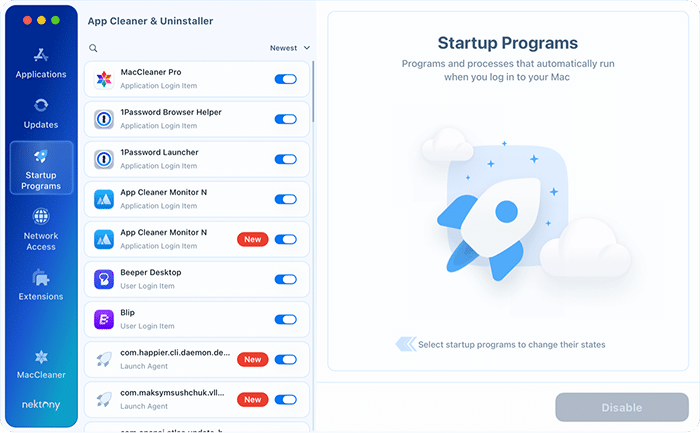
App Cleaner & Uninstaller provides a wide range of control on the other side of the extensions and startup items spectrum: its dedicated Extensions and Startup Programs tabs cover Login Items, LaunchAgents, and LaunchDaemons.
- In Startup Programs, you can see which items are active or disabled, and disable and remove app agents, daemons, and login items.
- In Extensions, you can check and remove installation files, browser extensions, settings panes, Internet plugins, or widgets.
App Lipo and architecture cleanup
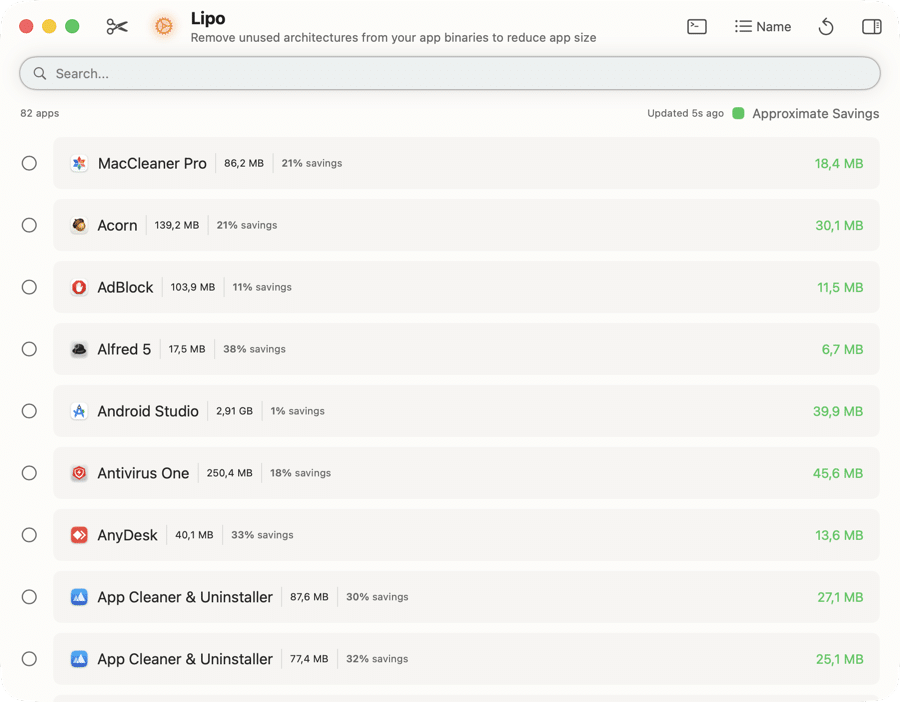
Pearcleaner has a unique App Lipo feature that removes the Intel (x86_64) portion from Universal Binary apps on Apple Silicon Macs.
Universal apps contain two architecture slices: arm64 for Apple Silicon and x86_64 for Intel Macs. On M-series Macs, the Intel slice is typically never used but still occupies disk space. PearCleaner’s App Lipo uses the macOS lipo system utility to strip the unused Intel architecture from supported apps.
Depending on the number of Universal apps installed, this can free anywhere from a few hundred MB to over 1 GB of storage.
Note:
lipo -info /Applications/AppName.app/Contents/MacOS/AppName
Copy
Network Access and app security
Instead of app lipo, App Cleaner & Uninstaller adds network control. The Network Access tab lists every app that has used the internet, how much data it moved, and when it was last online. Flip an app’s Internet Access switch off, and it stays installed but can’t connect. All traffic analysis runs on your Mac.
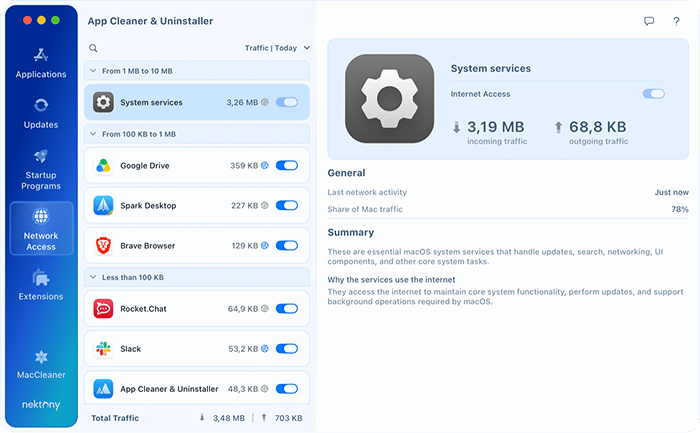
Each app’s profile also shows its Apple notarization status, with a warning icon for apps Apple hasn’t scanned for malware, and the permissions it holds, such as camera, microphone, or Full Disk Access. You can revoke any of them with a right-click → Revoke Permission.
Update scan results / findings
On an 81-app Mac, App Cleaner & Uninstaller found 54 pending app updates; PearCleaner found 16.
Pearcleaner’s Updates module development stalled in late 2025, so fewer apps are recognized compared to App Cleaner & Uninstaller’s actively maintained database.
Plus, the gap comes from detection breadth:
- App Cleaner & Uninstaller checks App Store, Sparkle, Electron, Squirrel, GitHub, Homebrew casks and command-line tools, Safari extensions, and direct developer download feeds.
- PearCleaner covers Sparkle and Homebrew, and redirects App Store apps back to the App Store rather than handling them in-app.
In Pearcleaner, update checks run automatically on launch (you can disable this in Settings). The number of available updates is visible directly in the toolbar, and users can skip specific versions or completely exclude selected apps from future checks.

In App Cleaner & Uninstaller, you can update most apps directly inside the tool without redirects. It includes a Skip List for updates, allowing specific versions to be ignored. The update engine is actively developed: in version 10, it was redesigned with an expanded supported-app database and gained support for Homebrew command-line tools and Safari extensions.

Where each tool falls short
Pearcleaner limitations
- False positives. Dynamic name-and-bundle-ID scanning can flag unrelated files. Redditors confirm a Pearcleaner problem with false positives. Review the file list carefully before confirming any deletion. Additionally, set the search sensitivity.
- macOS 12 and earlier not supported. Won’t install on Monterey or Big Sur; system returns a version mismatch error.
- App Lipo is irreversible. Stripping the Intel slice permanently prevents the app from running on Intel Macs. No built-in undo.
- Slowed update cadence since late 2025. The Updates module paused.
- Homebrew module requires a default install path and may malfunction. A non-default HOMEBREW_PREFIX causes the module to show no packages.
- Orphans tab has no app grouping. The flat service-file list makes it hard to judge which entries are safely deletable without manual investigation.
App Cleaner & Uninstaller limitations
- Paid, short trial: $14.95/year or $34.95 one-time; 2-day trial of full features.
- No Homebrew uninstall: You can’t uninstall apps installed via Homebrew.
- No App Lipo: Can’t strip architecture slices from Universal Binaries.
Final comparison: which tool fits your workflow
Neither tool is better in every area. The right choice depends on what you actually need from an uninstaller, how deeply you want to clean your Mac, and whether you’re willing to pay for it or prefer a free solution.
Choose Pearcleaner if:
- You need a free option, it has no cost, no subscription, and no trial expiry.
- You’re running macOS 13 Ventura or newer.
- You use Homebrew and want integrated formula and cask management.
- You’re a developer who needs dev tools cleanup and the app lipo feature.
- You’re okay with reviewing file lists manually before confirming each deletion.
Download PearCleaner from GitHub
Choose App Cleaner & Uninstaller if:
- You want safer, more accurate uninstalls backed by a 20,000+ app database.
- You need a wider update net, closest to MacUpdater, that covers all update channels and installs updates without redirects.
- You want a Remains tab that clearly groups leftovers by the former app.
- You want to see which apps go online, block the ones you don’t trust, and revoke app permissions.
- You need a product with commercial support and a predictable update history.
- Your Mac runs macOS 11 or newer.
Frequently asked questions
Is Pearcleaner safe to use on Mac?
PearCleaner is notarized by Apple and open-source under a fair-code license; the code is publicly auditable on GitHub. The main safety concern is false positives: dynamic scanning by name and bundle ID can flag unrelated files alongside the target app. Always review the file list before confirming any deletion. App Lipo is also irreversible; back up with Time Machine before using it.
What is the difference between Pearcleaner and App Cleaner & Uninstaller?
The main difference is approach: Pearcleaner is a free, developer-focused tool with dynamic scanning and advanced features like Homebrew support and App Lipo, while App Cleaner & Uninstaller is a commercial product that uses a 20,000+ app database for more structured, precise uninstalling and broader update coverage. It also adds network access control and permission management, provides dedicated customer support, and targets everyday Mac users.
Can either tool delete macOS default apps like Safari or Photos?
No, they can't. macOS System Integrity Protection (SIP) blocks the deletion of built-in Apple apps regardless of which tool you use. Attempts to remove SIP-protected apps return a permissions error. Neither Pearcleaner nor App Cleaner & Uninstaller provides a SIP bypass.
Does PearCleaner work on macOS Monterey or Big Sur?
No, Pearcleaner doesn't work on macOS Monterey or Big Sur. It requires macOS 13 Ventura or later. If you are running macOS 11 Big Sur or macOS 12 Monterey, you will need an alternative, such as App Cleaner & Uninstaller, which supports macOS 11+.
What tool removes app leftovers better?
App Cleaner & Uninstaller lists leftover files from previously deleted apps in its Remains view, grouped by the app that created them. Pearcleaner's Orphans feature shows a flat list without app grouping, so you have to investigate each entry before deleting it.
Is App Cleaner & Uninstaller worth paying for if PearCleaner is free?
It depends on your needs. PearCleaner is a strong free option for technically confident users on macOS Ventura or later. App Cleaner & Uninstaller has a polished UI, a curated app database, broader macOS support, network and permission controls, regular updates, and customer support. It's worth it for users who want reliability and simplicity without manual configuration.