


February 6, 2026
What is the best Mac cleaner: 10 Tools listed & tested in 2026


Share


About 77% of people say digital clutter gets them frustrated – slow devices, crashes, storage space disappearing out of nowhere. When that happens to the Mac, the obvious thing is to search for a Mac cleaner. Because with the right Mac cleaner, you can:
- reclaim storage taken by clearing caches, system data, and purgeable space,
- free up disk space by finding and removing large files, duplicates, and leftovers,
- boost performance by optimizing RAM, managing heavy apps and startup items.
To figure out what the best Mac cleaner is, we took 10 apps for an overview and tried them in real scenarios. By the end of this list, you’ll know what Mac cleaners can and can’t do, which app fits your needs, and which cleaner will be in the interests of your Mac.
Criteria for listing and testing the best Mac cleaners
To find the best Mac cleaner out of available options, we tested each tool using MacBook Pro M1 and MacBook Pro M3, both upgraded to macOS Tahoe 26.1, which, after years of usage, are full of system junk and clutter. Here’s what we looked at:
- Download source: Whether the app is available via the Mac App Store or the developer’s official website.
- Pricing model: Free versions, trials, one-time purchases, or subscriptions, and overall value for money.
- Interface & usability: How intuitive the design is, how easy it is to navigate, and how quickly a new user can get things done.
- Cleaning results: How well the app detects core cleanup categories – junk files, other files (installers, screenshots), purgeable space, and Trash.
- Extra features: Whether there is a disk analyzer, malware/adware protection, duplicate finder, helper, or any other add-on.
- Speed & performance: How fast scans run and how much RAM/CPU the app uses while working.
- Limitations & issues: Whether there are any blockers or practical drawbacks when working with the tool.
- Customer support: Whether there is tech support, a knowledge base, and the responsiveness of the support team.
- Update frequency: Recent updates and overall developer activity.
- Safety: Protection against accidental removal of critical system files.
- Localization: Number and quality of supported languages.
- Ratings: Independent reviews (Trustpilot, G2, MacUpdate, App Store), mixed with my own feelings.
Comparison table: Best Mac cleaning software
| App | Best for… | Price | Trial/Free | macOS | Core focus |
|---|---|---|---|---|---|
| MacCleaner Pro | Versatile cleanup workflows | $39.95/yr $85.95/one-time |
2 days | 11.0+ | Modular cleanup, detailed results |
| CCleaner | Basic cleanup tasks | $44.95/yr | Limited free | 10.12+ | Simple junk & browser cleanup |
| OnyX | Advanced system control | Free | Free | 10.2+ | Maintenance & hidden settings |
| Sensei | Performance monitoring & maintenance | $29/yr $59/one-time |
14 days | 14.0+ | Disk cleanup, system monitoring & hardware analysis |
| CleanMyMac | All-in-one maintenance | $40.2/yr $119.95/one-time |
7 days | 10.13+ | Cleanup, protection, optimization |
| Avast Cleanup | Entry-level automation | $65.99/yr | 30 days | 10.13+ | Automated junk cleanup |
| MacKeeper | Cleanup + privacy tools | $71.40/yr | 7 days | 10.15+ | Cleanup, antivirus, VPN |
| AVG TuneUp | Automated cleanup & duplicates management | ~$65.99/yr | No | 10.12+ | Automated junk & duplicate cleanup, photo cleanup |
| Cleaner One Pro | Simple visual cleanup | $24.99/yr | Limited free | 10.15+ | Junk, large files, duplicates |
| BuhoCleaner | Lightweight cleaning | $39.99/yr or $96.99 one-time | Limited free (3 GB) | 10.10+ | Fast cleanup & toolkit |
MacCleaner Pro: Structured cleanup with advanced control

|
Cost: $39.95/year or $85.95 one-time |
|---|---|
| Trial: 2 days | |
| Compatibility: macOS 11.0+ | |
| Rating: 4.8/5 ★ by TrustPilot |
MacCleaner Pro is a suite-based cleaner that combines several tools without packing everything into one overloaded app. It covers essential cleanup tasks like:
- clearing junk files, caches, and purgeable space
- deleting large files, duplicates, and applications
- optimizing RAM
- analyzing disk space
- revealing hidden files
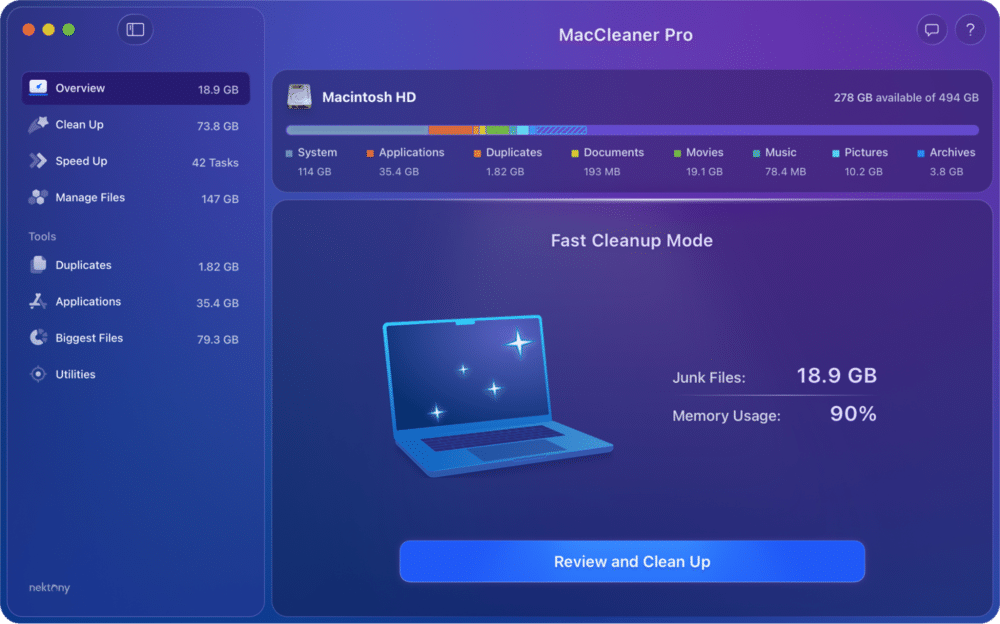
The suite means that although you can enjoy all the features inside, you can open the main functions in their own tool.
The interface follows macOS design patterns closely, so actions feel predictable and easy to follow. Scan results are detailed, and quantitative data make it easy to see what’s being removed.
Pros:
Clear results with strong detection across categories
Advanced tools like app updater, RAM optimizer, and disk analyzer included
Removal history with restore option if Trash wasn’t emptied
Cons:
No malware or threat protection
Requires switching between suite apps for different tasks
Most features locked after trial ends
CCleaner: Very basic cleanup tasks

|
Cost: $44.95/year |
|---|---|
| Trial: Free version with limited features | |
| Compatibility: macOS 10.12+ | |
| Rating: 4.8/5 ★ by TrustPilot |
CCleaner is about simple cleanup scenarios that cover caches, logs, browser data, basic duplicate detection and app removal. The only convenient part here is that you can set caches, browser history, and Trash to be cleared automatically.
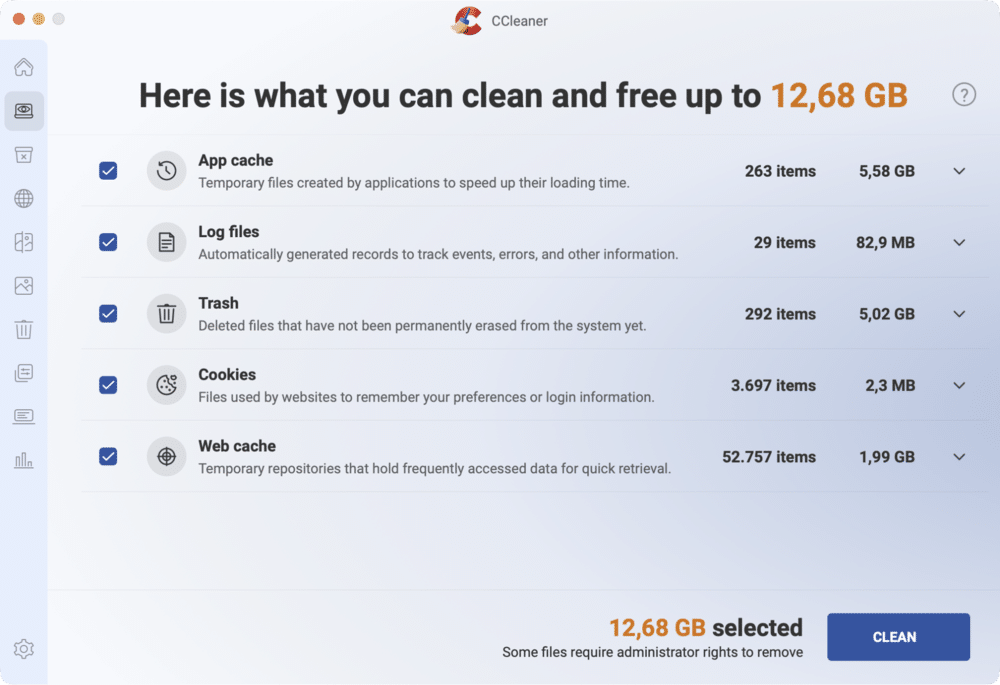
The interface is minimal, but navigation can feel inconsistent when moving between sections. The feature set feels trimmed down, with no purgeable space cleanup or RAM optimization. Scan results don’t always persist between tabs, which can slow your flow.
It fits users who want minimal configuration and familiar naming. Pricing is subscription-only, which may feel limiting given the feature set.
Pros:
Simple interface with minimal learning curve
Duplicate finder and browser cleanup included
Automatic cleaning options for caches and Trash
Cons:
Limited cleanup depth
No malware or threat protection
No RAM optimization or purgeable space cleanup
OnyX: Advanced system control

|
Cost: Free |
|---|---|
| Compatibility: macOS 10.2+ (version must match macOS) | |
| Rating: 4.4/5 ★ by MacUpdate |
OnyX is a technical utility that exposes many hidden macOS maintenance and configuration functions usually handled via Terminal, wrapped in a GUI. It gives you access to:
- system maintenance scripts
- Spotlight reindexing
- cache cleaning
- APFS snapshot management
- deep Finder and Dock tweaks
Cleanup and maintenance actions are manual, and there’s no automatic junk detection.
The interface is functional but not beginner-friendly, and occasional launch or update issues may require system restarts.

Because deletions are permanent, it requires careful use. There’s no safety net like previews or size estimates, which makes it easy to remove something unintentionally.
Pros:
Powerful maintenance tools
No cost
Deep system access
Cons:
High learning curve
No safety net for deletions
No automated junk detection
Sensei: Mac monitoring and SSD maintenance

|
Cost: $29/year or $59 one-time |
|---|---|
| Trial: 14 days | |
| Compatibility: macOS 14.0+ | |
| Rating: 3.5/5 ★ by Macworld |
Sensei positions itself closer to detailed hardware and system monitoring than a full cleanup solution. It shows detailed data about:
- storage
- graphics
- cooling
- battery health
- SSD TRIM behavior
Cleanup tools exist but are limited to large files, caches, installation files, and basic app removal. The app feels more like a diagnostic dashboard than a cleaner.

Some interface bugs and aggressive purchase prompts impact usability, especially during longer sessions. It’s useful if you care about what’s happening under the hood rather than reclaiming space fast.
Pros:
Detailed software and hardware monitoring
SSD trim and hardware insights
Cons:
Mediocre cleanup capabilities
Aggressive upgrade prompts
No malware protection
CleanMyMac: All-in-one maintenance

|
Cost: $40.20/year or $119.95 one-time |
|---|---|
| Trial: 7 days (email & card required) | |
| Compatibility: macOS 10.13+ | |
| Rating: 4.7/5 ★ by TrustPilot |
CleanMyMac bundles cleanup, optimization, and security features into a single app. It’s applicable in most common scenarios: junk removal, duplicate files, app uninstallation, startup management, and cloud storage cleanup.

The UI welcomes with its beautiful colors and design, which lowers the entry barrier. At the same time, scans – especially Smart Care – can take significantly longer than others. System load during heavy scans is also higher. Most features are available in a paid plan, and helper notifications can feel excessive.
Pros:
Broadest feature coverage in one app
Built-in malware protection
Guided, beginner-friendly interface
Cons:
Heavy RAM and CPU usage during scans
Most features require purchase
No file recovery
Avast Cleanup: Familiar cleanup with minimal setup

|
Cost: $65.99/year |
|---|---|
| Trial: 30 days | |
| Compatibility: macOS 10.13+ | |
| Rating: 4.4/5 ★ by TrustPilot |
Avast Cleanup will be a recognizable layout for users familiar with Avast products. It handles cache cleanup, duplicates, browser data, and app removal through simple scan and clean flows.
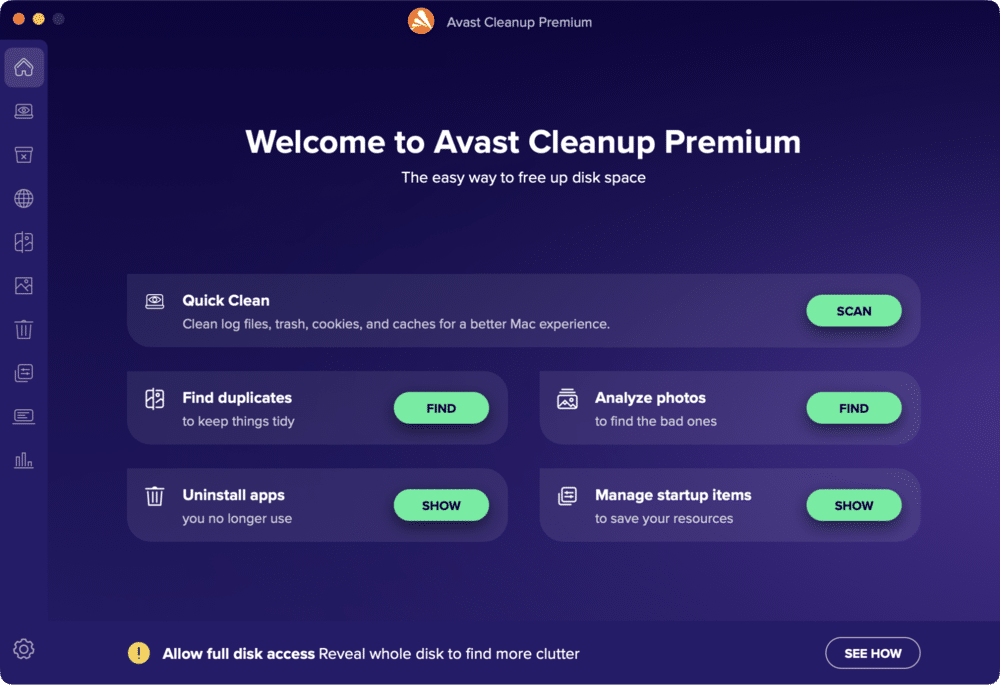
The interface is simple and user-friendly. However, scan results reset when switching sections, and advanced Mac-specific features are missing. There’s no RAM optimization or purgeable space cleanup, and security features are not included despite the brand.
Pros:
Easy to use
Consistent interface
Cons:
No malware protection/advanced optimization
Scan results reset between sections
Limited feature depth
MacKeeper: Security, cleaning, performance & privacy

|
Cost: $71.40/year |
|---|---|
| Trial: 7 days | |
| Compatibility: macOS 10.15+ | |
| Rating: 4.3/5 ★ by TrustPilot |
MacKeeper mixes cleaning features with antivirus, VPN, and identity protection. Here, you can do junk files, duplicates, memory cleaning, app updates, and protect your privacy with an adblocker and ID theft guard.

The interface is structured and functional around guided actions. But notifications and purchase pop-ups are frequent, especially early on. System load during scans is noticeable, and scans can take about a minute. Customization is limited in the trial.
The app is the most expensive per year, which may be a limiting factor for some users.
Pros:
Integrated antivirus and privacy tools
Nice category-based UI
Wide feature stack (e.g., app updater included)
Cons:
No purgeable space cleanup and file recovery
Aggressive notifications
Subscription-only model (and it’s costly)
AVG TuneUp: Automated cleanup & duplicates

|
Cost: $65.99/year |
|---|---|
| Trial: No formal free trial (30-day money-back guarantee from vendor) | |
| Compatibility: macOS 10.12+ | |
| Rating: 4.5/5 ★ by Trustpilot |
AVG TuneUp feels like a maintenance assistant and leans more toward automation rather than deep, manual control, aiming to keep storage tidy in the background with minimal user input. Its core features include:
- automatic junk file cleanup (caches, logs, temporary files)
- duplicate file and questionable photo detection
- browser cleanup
- startup item management to reduce boot time

The interface is approachable. Its strongest point is customization. You can whitelist filters before cleanup, which reduces the risk of deleting important data. But app uninstallation may be tricky. There’s no RAM optimization, purgeable space cleanup, or recovery history. Subscription-only pricing and the absence of a trial can be frustrating.
Pros:
Fast, automated cleanup
Strong customization
Simple setup with minimal configuration
Cons:
No malware protection
No free trial
No deep Mac-specific optimization features
Cleaner One Pro: Visual file cleanup

|
Cost: $24.99/year |
|---|---|
| Trial: Free version with limits | |
| Compatibility: macOS 10.15+ | |
| Rating: 3.5/5 ★ by MacUpdate |
Cleaner One Pro presents cleanup in a visually clear way, focusing on junk files, large files, duplicates, and disk mapping. It’s also equipped with App and Photo Managers. The layout is easy to understand and works well for storage overview tasks, though some scans may freeze or require restarting.

Customization options are available, but advanced macOS maintenance options are missing. It works well for basic cleanup, but most features are locked behind a subscription.
Pros:
Visual disk map and file grouping
Easy navigation
Low system impact
Cons:
Subscription only
No purgeable space cleanup and file recovery
No malware/threats protection
BuhoCleaner: Lightweight cleaning

|
Cost: $39.99/year or $96.99 one-time |
|---|---|
| Trial: Free cleanup up to 3 GB | |
| Compatibility: macOS 10.13+ | |
| Rating: 4.7/5 ★ by TrustPilot |
BuhoCleaner keeps things minimal: fast scans, basic cleanup categories, and a small toolkit for optimization tasks like flushing DNS or reindexing Spotlight.
It detects junk files, large files, duplicates, startup items, and purgeable space while keeping RAM usage low. You can also uninstall apps and their leftovers with it.

The design is simple and predictable. Security features and recovery tools are not included, and the free version is limited by cleanup size.
Pros:
Fast scans with low RAM usage
Clear categorization
Includes purgeable space cleanup
Cons:
No malware or security features
Free version has strict limits
Feature set is mid-range
Final list: Mac cleaners by user profile
You’ve seen the full range of cleaners built with a different mindset: control, automation, or simplicity. None of these tools is universally ‘best’; they’re best for various types of Mac users. The trick is choosing what matches your habits, not chasing the longest feature list.
| Tool | Best for users who… |
|---|---|
| MacCleaner Pro | Want a single toolkit that works for everyday cleanup and advanced Mac maintenance. |
| CCleaner | Are casual users looking for a very basic cleanup with minimal interaction. |
| OnyX | Are technical users who understand macOS internals. |
| Sensei | Care more about system monitoring and hardware insights than classic cleanup. |
| CleanMyMac | Prefer hands-off cleanup with almost no configuration. |
| Avast Cleanup | Want a single toolkit that works for everyday cleanup and advanced Mac maintenance. |
| MacKeeper | Want cleanup plus security and privacy utilities in a single app. |
| AVG TuneUp | Want background cleanup without touching advanced settings. |
| Cleaner One Pro | Like a straightforward, visual overview without deep system tweaks. |
| BuhoCleaner | Want fast results with minimal overhead and no extra layers. |