
July 17, 2026
Everything about App Cleaner & Uninstaller


Share


A real uninstaller earns its name by matching specific criteria before it’s worth trusting:
- It shall remove apps fully, safely, and properly, with every leftover file gone;
- It’s better if it brings extra perks on top, especially helpful ones like app updates;
- It’s supposed to make clearing up a Mac a simple task that takes seconds.
If that’s what you expect from an uninstaller, the next thing is to learn the whole story behind App Cleaner & Uninstaller, whether it delivers enough value to justify its price.
This page is dedicated to App Cleaner & Uninstaller, containing every detail about the utility: what it is, what it does, who it’s for, how it works, what independent reviewers say, where it’s strong, where it isn’t, how it compares to free or paid alternatives, and any other valid questions you may have.
| Field | Value |
|---|---|
| Developer | Nektony |
| First release | July 23, 2015 |
| Current version | 10.0.1 (Sep. 2026) |
| macOS support | macOS 11.0-27 |
| Category | App Uninstaller/Management utility |
| App database | 20,000+ apps |
| Pricing | Free + Paid (subscription or one-time) |
| Users | 10+ million |
This Article Contains
- What App Cleaner & Uninstaller is
- How App Cleaner & Uninstaller works
- Who App Cleaner & Uninstaller is for
- Who App Cleaner & Uninstaller is not for
- Is App Cleaner & Uninstaller safe?
- What reviewers and users say
- Pricing and trial
- Free vs paid versions
- App Cleaner & Uninstaller vs AppCleaner vs Pearcleaner
- How to try App Cleaner & Uninstaller
- FAQs
What App Cleaner & Uninstaller is
 |
Priced at: $7.95/month, $14.95/year, $34.95 one-time |
|---|---|
| Trial available for: 2 days of a free full feature set | |
| Compatible with: Intel and Apple Silicon, macOS 11.0-27 | |
| Rated at: 4.9 by Trustpilot | |
| Notarized by: Apple |
App Cleaner & Uninstaller is a Mac uninstaller and app manager by Nektony, a Ukrainian software development team that has been building Mac tools since 2011. The project’s story began back in 2015, when the tool was introduced as a simple uninstaller.
Since then, App Cleaner & Uninstaller has expanded well beyond its original purpose. Some of its most notable milestones include:
- 2015: Launch
Released the first version as a dedicated uninstaller, removing apps and their leftovers. - 2020: Apple Silicon M1 support
Added native support for Apple Silicon Macs. - 2023: Major update
Introduced a redesigned interface and new pricing model (subscription and one-time). - 2024: Updates module
Delivered an app update feature, which transformed the tool into a total app utility. - 2026: AI Summary, Privacy Audit, and Security Check
Rounded out with checking AI-powered app insights, verification, and permissions.
Thus, what started as a unified solution for uninstalling apps completely is now a complete app management tool: uninstalling, updating, or resetting apps, clearing app caches, managing startup items and extensions, and checking app permissions, all under the same roof.
How App Cleaner & Uninstaller works
App Cleaner & Uninstaller is built around solving common pain points Mac users face:
- You drag an app to the Trash, but its files stay untouched in Library hidden folders;
- You wish there were one place to keep all apps updated (like MacUpdater);
- You want to reset to default settings or clear cache without uninstalling an app;
- You’d better remove leftovers from previously deleted apps, avoiding a manual way;
- You have a series of startup items to manage and wanna do it from a quick panel;
- You’ve gathered installers, downloads, and want to remove them to free up space;
- You’ve got a full startup disk and want to get rid of unused apps;
- You want to know what permissions an app has without opening System Settings;
- You have a bunch of apps, and keeping them organized becomes a challenge;
- You stumble across an app and can’t remember what it’s for, whether it’s secure.
To that end, App Cleaner & Uninstaller runs as eleven modules to bridge those gaps. Most of them are accessible from the left sidebar.
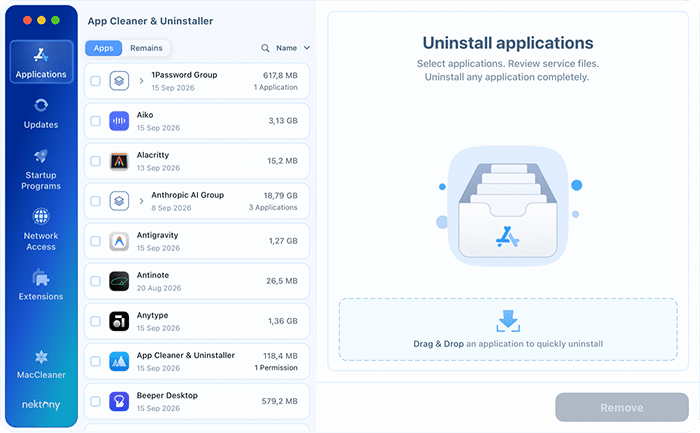
Applications
It’s the main module, which refers to the full removal of an app along with its caches, logs, preferences, and hidden support folders. The matching runs against a database of more than 20,000 known apps, which is what keeps the list of related files accurate instead of guessing based on the app’s name.
This module takes you a little: select any installed app, and click uninstall.
Remains
The next closest feature is deleting leftover files from previous deletions. It finds service files left behind by apps you’ve already deleted. This is helpful after a manual removal by dragging to Trash or when cleaning up a Mac that has collected years of leftovers.

With Detect apps moved to Trash and offer full removal turned on in Settings, the tool catches new leftovers the moment you drag an app to the Trash.

Updates
Another useful functionality is updating apps. The convenient things about it are:
- You install updates directly out of the box without redirecting elsewhere.
- You’ll have updates for apps across all main frameworks: App Store, Sparkle, Electron, Squirrel, Homebrew (CLI tools included), GitHub, and Safari extensions.
- As a result, the detection number is comparable to MacUpdater’s.
- You can use a batch update and select all updates for installing at once.
- In our 65-app test, the scan took about 4 seconds and found 54 updates, with 0 false positives.

Startup programs FREE
With this capability, you are free to manage Login Items, Launch Agents, and System Daemons in a single view. You can disable anything you don’t want auto-launching at boot without going to System Settings or opening respective folders manually in Finder. It can be a workaround when a Mac slows down and takes a while to finish starting up.

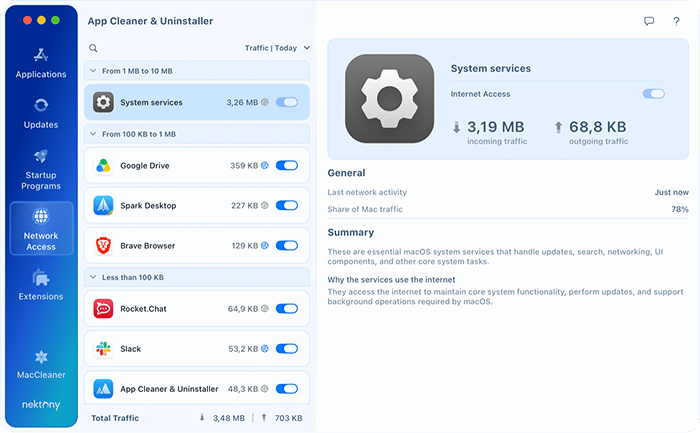
Network Access FREE
This module shows which apps use the internet and lets you block their access. It also displays how much data each of them downloads and uploads and when it was last online. If an app has no reason to connect, flip its Internet Access switch off. The app stays installed and usable offline, and you can switch it back on at any time.
All traffic analysis happens on your Mac. The first time, you allow App Cleaner & Uninstaller’s network extension in System Settings → General → Login Items & Extensions.
Extensions
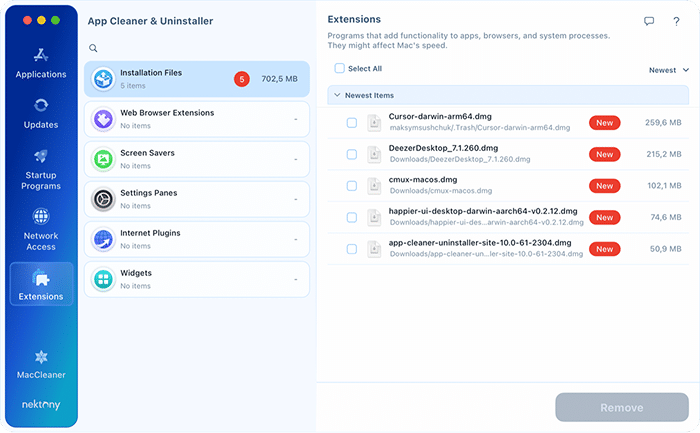
This one lists browser extensions, plugins, and Preference Panes you can manage, instead of hunting through each browser’s or app’s own settings menu. You can also remove extensions that no longer have a parent app installed.
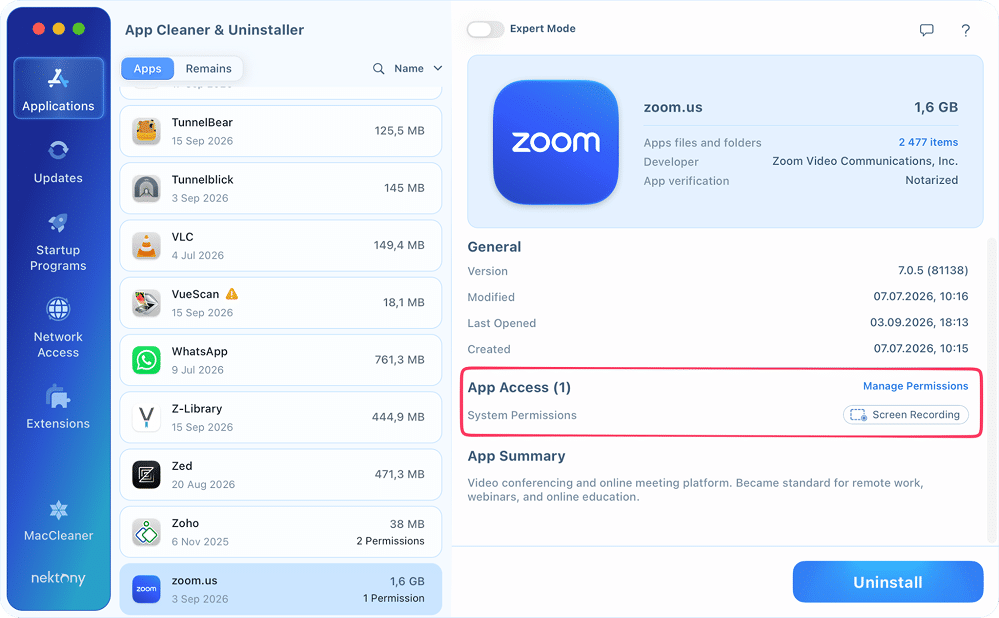
Privacy audit
This is one more extra string that shows which apps have access to your camera, microphone, location, contacts, calendar, and local folders. Instead of opening System Settings to revoke any permission, you can do it directly from the utility.
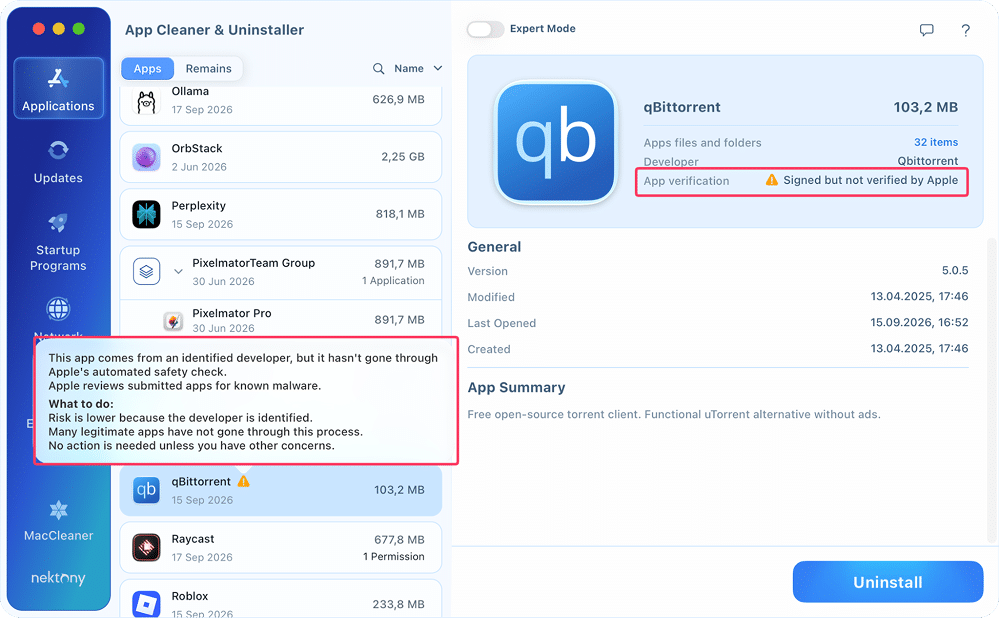
Notarization checker
In the app verification line, you can check Apple’s notarization status for each installed app, so you can see which ones haven’t been through Apple’s malware screening. This one is about your security and comes for you to decide whether to trust this or that app.
AI app summary
When you select an unknown app, this brand-new module generates a plain-language description of what it does. It’s handy when cleaning up a Mac and running into apps you don’t recognize. This feature requires macOS Tahoe (macOS 26) and Apple Silicon (M1 or later). Not available on Intel Macs or earlier macOS versions.
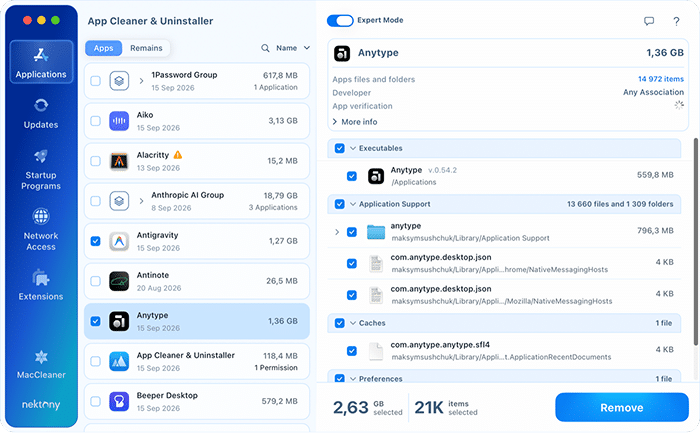
Basic and expert mode
In the Applications tab, you can view selected apps in two views:
- Basic Mode shows a simplified layout for users who want to uninstall without configuring anything.
- Expert Mode exposes all file paths and advanced settings. For instance, you can select the cache folder and remove only it.
You can switch between them at any time with the Expert Mode toggle at the top center of the window.
Open with
Here, you can set an application that will open a file of a specific format by default. Accessible in the top menu → View → Open with.

Helper agent
Finally, App Cleaner & Uninstaller has a helper pinned in the top menu. It reports on four areas:
- Applications: how much disk space your installed apps take up in total
- App updates: how many updates are waiting to be installed
- Startup apps: how many items launch with your Mac
- Network access: how many apps are allowed online and how many you’ve blocked

What App Cleaner & Uninstaller can’t do
To avoid frustrations, it would be fair to specify the tool’s limits:
- It doesn’t remove Apple’s own system apps, Mail, Safari, and similar. That’s macOS protecting itself at the architecture level, not a gap in the tool.
- It doesn’t manage apps installed on external or secondary drives.
- It’s not antivirus software and doesn’t scan for malware.
- It doesn’t recover data that’s already gone for good.
- There’s no VPN built in.
- AI App Summary only runs on Apple Silicon Macs (M1+) with Tahoe+ installed.
Who App Cleaner & Uninstaller is for
- You’re running out of disk space and don’t know why. App leftovers accumulate across years. An intensive user who has installed and removed dozens of tools may have gigabytes of orphaned files. The Remains list catches those; the Applications module makes sure future removals don’t leave the same mess.
- You want to be sure an app is fully gone. Moving an app to Trash leaves in place all files, other than the executable one. App Cleaner & Uninstaller shows the complete file list before removal, so you start clean.
- You’re tired of checking updates one app at a time. The Updates module handles App Store apps and non-App Store apps together. For a Mac running a mix of apps, it replaces manually opening each one to look for an update badge.
- You want to see what’s running at login. Startup Programs shows every Login Item, Launch Agent, and Daemon in one list, no need to dig through the Library or hunt around in System Settings.
- You want to know which apps have camera or microphone access. The Privacy Audit module gives you a per-app breakdown of granted permissions. If you’ve installed and removed several video or recording tools over the years, it’s worth a look.
- You want control over which apps go online. Network Access shows the traffic of each app and blocks the ones you don’t trust, without uninstalling them.
Who App Cleaner & Uninstaller is not for
- If all you need is a basic, no-frills uninstaller with nothing else attached, the free AppCleaner does that job on its own.
- If your priority is disk-wide cleanup, duplicate files, and general junk rather than app management, that’s a different tool category. MacCleaner Pro matches this demand.
- You need Homebrew-aware uninstall or Universal Binary slimming. PearCleaner handles both. App Cleaner & Uninstaller updates Homebrew packages but doesn’t remove them, and doesn’t strip Intel binary slices from Universal apps.
- You’re on Intel and want AI features. AI App Summary requires Apple Silicon (M1+) and macOS Tahoe. It won’t appear on older hardware or macOS versions.
Is App Cleaner & Uninstaller safe?
Spoiler to this question is yes, App Cleaner & Uninstaller is safe. It’s Apple-notarized, which adds more confidence to use it as a reliable and trustworthy utility. Apple’s notarization means it passed automated checks on the code for known malware before signing it. And here are some more facts about privacy, security, and protection:
Does it delete files automatically?
No, App Cleaner & Uninstaller doesn’t delete files without showing a preview. Every removal starts with a preview list. You see what will be deleted, can uncheck individual items, and confirm before anything happens.
Does it touch personal files?
No, App Cleaner & Uninstaller targets service files: caches, preferences, launch agents, and support folders tied to specific applications. It doesn’t scan or remove documents, photos, downloads, or anything in your personal folders.
Does it require special permissions?
Full Disk Access is optional but recommended: without it, App Cleaner & Uninstaller can’t find all leftover files in protected folders. You can grant it from the app at any time.
Does it restore deleted files?
Files removed through App Cleaner & Uninstaller go to the Trash by default, so you can restore them as long as you haven’t emptied it. In settings, you can also switch to immediate deletion. In this case, Time Machine covers anything you’ve already emptied.
Does it collect or share my personal data?
No, App Cleaner & Uninstaller doesn’t collect or share your personal data. It performs all scans locally on your Mac, and it doesn’t upload the files it finds. It collects only limited technical information, such as crash reports or anonymous analytics to improve the product. You can learn more in our Privacy Policy.
What reviewers, users say about App Cleaner & Uninstaller
Self-description only goes so far, so this is how independent sources rate it.
- App Cleaner & Uninstaller won a Red Dot Design Award for the interface, confirmed independently on Red Dot’s own project listing.
- Macworld reviewed App Cleaner & Uninstaller in 2026 and noted significant improvement in the Remaining Files module and the new Update feature.
- On Trustpilot, users consistently mention how straightforward and effective it is to use Nektony’s tools, reflected in its 4.8/5 rating.
- On MacUpdate, reviewers assessed App Cleaner & Uninstaller with a 4.3/5 rating, and the number of downloads reached more than 13,000.
- On Reddit, redditors constantly recommend and praise App Cleaner & Uninstaller for the way it gets things done.
Trustpilot feedback


Redditors feedback


Pricing and trial
The trial gives you 2 full days of Pro access, no account or card required. For a single Mac, pricing starts at:
- $7.95/month
- $14.95/year as a subscription, or
- $34.95 as a one-time purchase.
Multi-Mac and other plan options are listed on the official pricing page.
Free vs paid versions
- The free version lets you scan and preview apps, restore apps from Removal History, and control apps’ internet access with Network Access.
- Pro unlocks app removal, batch operations, and all other modules.
| Feature | Free | Pro |
|---|---|---|
| Scan and preview app files | ||
| One-click full removal | ||
| Batch uninstall | ||
| Remains (leftovers of deleted apps) | ||
| Startup Programs | ||
| Extensions management | ||
| Updates module | ||
| Privacy Audit | ||
| AI App Summary | ||
| Restore from Removal History | ||
| Network Access |
App Cleaner & Uninstaller vs AppCleaner vs Pearcleaner
Three options come up most often when people search for Mac uninstallers.
| Feature | App Cleaner & Uninstaller | AppCleaner | PearCleaner |
|---|---|---|---|
| Price | From $14.95/yr | Free | Free |
| App database | 20,000+ | ||
| False positives | Minimal | Medium | Known issue |
| App Updater | (active) | Frozen since 2025 | |
| Startup Manager | |||
| Privacy Audit | |||
| Homebrew uninstall | |||
| Homebrew updates | Casks and CLI tools | Reported issues | |
| Network Access | |||
| Last updated | 2026 | 2023 | 2025–2026 |
AppCleaner (by FreeMacSoft): Long-standing free option
- Drag an app onto its window, and it finds associated files, you remove them.
- Its last update was mid-2023, which means it hasn’t kept pace with newer macOS versions or more complex modern apps.
- For someone who installs and removes apps rarely, it’s fine.
- For anyone managing a Mac actively, it shows its age.
- There’s no batch removal, no updater, no startup manager, only basic app removal.

PearCleaner (by Alin Lupascu): Open-source uninstaller
- Free for personal use under a fair-code license, open-source, and actively developed.
- Attracted serious attention: 13,000+ GitHub stars and active community contributions.
- It requires macOS 13 Ventura or newer.
- Because it uses dynamic scanning by app name and bundle ID rather than a curated database, it’s prone to false positives.
- Its update-checking module hasn’t seen development since late 2025.
- Reddit threads have pointed out cases where it flags unrelated files under the wrong app, mistakenly associated with that browser as app support files.
- It supports Homebrew uninstalls and App Lipo, stripping the Intel slice out of Universal Binaries, something neither AppCleaner nor App Cleaner & Uninstaller does.


App Cleaner & Uninstaller: App uninstaller, updater, and checker
- The database of 20,000+ apps makes a difference, making its file relation engine powerful and update detection logic smart. This keeps false positives low and the list of related files accurate, instead of relying on a name match and hoping it’s right.
- The Updates module has stayed active into 2026, with zero false positives across an 81-app test, roughly a 4-second scan.
- Beyond uninstalling, it deals with updates, startup items, extensions, Privacy Audit, a notarization check, and Network Access in the same window.
- It supports a wider macOS range than PearCleaner (macOS 11.0-27).
- The con is cost, and no Homebrew uninstall or App Lipo support.
The choice comes down to scope:
- AppCleaner for simple removal at no cost,
- PearCleaner for Homebrew and App Lipo support with some manual review,
- App Cleaner & Uninstaller for a full app management with consistent results and active support.
How to try App Cleaner & Uninstaller
- Get App Cleaner & Uninstaller for free on the official website.
- Open the executable file.
app-cleaner-uninstaller.dmgCopy
- Drag App Cleaner & Uninstaller to Applications.
- Run App Cleaner & Uninstaller. Free to try. 2-day full Pro trial. No account required.


For the detailed how-to-use guide, go to the App Cleaner & Uninstaller help page.
Frequently asked questions
How will App Cleaner & Uninstaller benefit my Mac?
App Cleaner & Uninstaller helps keep your Mac apps organized:
- It removes apps together with their leftover files.
- It lets you keep installed software up to date.
- It controls which apps can reach the internet.
- It combines startup items, extensions, app permissions, and other app-related settings in one tool.
The result is less clutter, less manual work, and more saved time.
Is App Cleaner & Uninstaller safe?
Yes. It’s Apple-notarized, requires explicit confirmation before any deletion, and doesn’t touch personal files. Files removed go to the Trash by default, so you can recover them. Nektony doesn’t collect or sell user data.
How is App Cleaner & Uninstaller supported?
Nektony actively maintains App Cleaner & Uninstaller by releasing regular updates and delivering compatibility improvements for new macOS releases, bug fixes. In case you need help, you are free to contact the support team by email.
Is App Cleaner & Uninstaller legit?
Yes. App Cleaner & Uninstaller is developed by Nektony, a long-established macOS software developer. The app is notarized by Apple, trusted by millions of users, and has received positive reviews on independent platforms such as Trustpilot and Macworld.
What's the difference between App Cleaner & Uninstaller and AppCleaner?
They’re different products from different developers:
- AppCleaner is a free minimalist tool by FreeMacSoft, last updated in 2023.
- App Cleaner & Uninstaller is a paid full app utility by Nektony, updated through 2026, equipped with a 20,000+ app database, deep app uninstallation, the Remains list, Updates, Network Access, Privacy Audit, and Startup Programs modules.